Learn
Agentic development — the control plane
Share the queue among a team and a fleet of workers with trilha-cloud, and what the contract looks like if you run your own.
One runner on one machine serves one person. A team with several machines, several projects and agents working in parallel needs somewhere that answers what is queued, who is executing what, what evidence did that run leave and who asked for it — without the code of any project leaving the machine that holds it. That is trilha-cloud, and it is private: the protocol and the runner are open so that any tool can speak them; the control plane is where operating a fleet costs something.
                    trilha-spec (protocol)
                           │
          ┌────────────────┼────────────────┐
          ▼                ▼                ▼
   trilha-runner      Claude Code      another runner
          │                │                │
          └────────────────┼────────────────┘
                           ▼
                     trilha-cloud
        projects · queue · fleet · evidence · audit
trilha-cloud is itself a Trilha application — file-based routes, trilha gen, auth.APIKeys, c.Audit — which makes this chapter also the largest example of the framework in use.
The flow#
If you have access to the repository, one process is the whole control plane:
export TRILHA_SECRET=$(trilha secret)
export TRILHA_CLOUD_ADMIN_TOKEN=change-me
export TRILHA_CLOUD_DATA=./data/cloud.json
make dev                                  # http://localhost:3000
The operator registers a project and issues a key for the workers. Administration is behind the token from the environment — the first key has to come from somewhere — and everything else is behind keys with scopes:
curl -X POST localhost:3000/api/admin/projects -H "Authorization: Bearer change-me" \
     -d '{"name":"agenda","org":"learn","repo":"git@github.com:you/agenda"}'
curl -X POST localhost:3000/api/admin/keys -H "Authorization: Bearer change-me" \
     -d '{"name":"laptop","project":"agenda","expires_days":30,"scopes":["runs:read","runs:write"]}'
# {"key":"tc_…"}   shown once; the secret is peppered with TRILHA_SECRET and never stored
Anyone with a key queues a task — the same TASK-002 from the previous chapters:
curl -X POST localhost:3000/api/runs -H "Authorization: Bearer tc_…" \
     -d '{"project":"agenda","task_id":"TASK-002"}'
# {"id":"run-000001","status":"queued",…}
And a worker — a trilha-runner on a machine that has a checkout of the agenda — takes it:
cd agenda
trilha-runner worker --cloud http://localhost:3000 --token tc_… --project agenda --once
# worker laptop on http://localhost:3000, project agenda
# TASK-002 → review (driver exec, 48s)
# branch trilha/task-002 in .trilha/runs/TASK-002/wt
# ✓ go test ./... (exit 0)
The worker asked for the next run, executed it locally exactly as in the runner chapter and reported status, branch, commit and the evidence records. Open http://localhost:3000: the dashboard shows the project, the run in review with its branch, and the fleet — laptop, idle, seen seconds ago. The reviewer's approval is DELETE /api/runs/run-000001 (review → done): the same human decision the protocol keeps out of the agent's hands.
Every step is in the audit trail, with the key that did it as the actor:
curl localhost:3000/api/admin/audit -H "Authorization: Bearer change-me" | jq '.[].action'
# "run.closed" "run.finished" "run.claimed" "run.enqueued" "apikey.emitiu" "project.created"
Reproduce the homologated flow#
The Cloud repository carries an executable acceptance of the whole ecosystem, not a prebuilt fixture. Every run creates a fresh application and protocol:
| Component | What the acceptance exercises |
|---|---|
trilha | new, openapi, the ten check gates (from gen to surface), ctx, build, the page and generated API |
trilha-spec | init, spec new, task add, task move, doctor, context and evidence |
trilha-runner | Cloud worker, isolated worktree, echo driver, checks, branch and commit |
trilha-cloud | project, key, queue, claim, result, review, approval, audit, portal and persistence |
Run the complete acceptance from the trilha-cloud checkout:
make homologate
# or include the Cloud gate and headless-browser portal acceptance
make check-all
The protocol is generated through its public CLI rather than copied from the repository:
trilha-spec init "$APP_DIR"
cd "$APP_DIR"
trilha-spec spec new "Homologate the Trilha ecosystem"
trilha-spec task add "Execute the end-to-end ecosystem flow" \
  --spec 001-homologate-the-trilha-ecosystem \
  --agent coder \
  --accept "trilha-runner creates TRILHA_RUN.md inside an isolated worktree" \
  --accept "the generated Trilha application remains green" \
  --check "test -f TRILHA_RUN.md" \
  --check "go test ./..."
trilha-spec task move TASK-001 ready
trilha-spec doctor
trilha-spec context TASK-001 --json
The Cloud then queues the generated task and invokes a real worker:
trilha-runner worker \
  --cloud http://127.0.0.1:3901 \
  --token tc_… \
  --project homologation-app \
  --name homologation-worker \
  --once \
  --driver echo
Acceptance requires TASK-001 to reach review with branch trilha/task-001, a commit and passed evidence for test -f TRILHA_RUN.md and go test ./.... The same evidence is read through trilha-spec evidence TASK-001 --json and the Cloud API. The script then approves the run, verifies the six audit events from project creation through run.closed, restarts the control plane and confirms that the final done status persisted.
To exercise the UI, start the Cloud with make dev, open http://localhost:3000, use Configure access to store the admin token and the generated key in the browser session, then register the application, queue TASK-001, inspect its evidence after the worker exits and select Approve. The application source remains in the worker checkout throughout the procedure.
The deterministic echo driver keeps this acceptance independent from a model provider. AI drivers, remote sandboxes, billing and production deployment belong to separate acceptance environments.
The browser part is also available as make homologate-ui. It drives the real portal through Chrome DevTools: configures access, registers a project, issues a key, queues a run, opens protected evidence and approves the review.
Product Studio: create the product without a CLI#
In Trilha Cloud 0.2.0, the operator can enable a managed workspace and the user completes the whole cycle through the UI. The CLIs still run behind the Cloud, but they are no longer the product creator's responsibility.
The operator starts the Cloud once, defining where projects may be created and which homologated binaries it may invoke:
cd trilha-cloud
mkdir -p data workspaces
export TRILHA_SECRET="$(trilha secret)"
export TRILHA_CLOUD_ADMIN_TOKEN='replace-with-an-admin-token'
export TRILHA_CLOUD_DATA="$PWD/data/cloud.json"
export TRILHA_CLOUD_WORKSPACE_ROOT="$PWD/workspaces"
export TRILHA_BIN="$(command -v trilha)"
export TRILHA_RUNNER_BIN="$(command -v trilha-runner)"
make dev
Open http://localhost:3000, select Configure access and enter the admin token. Then select New product and enter:
- name
cadastro-usuariosand organizationtrilha; - description
User registration with login and password change; - module
example.com/trilha/cadastro-usuarios; - template
app, languagePortuguês, and theEchodriver for deterministic homologation — useAIonly when its provider is configured in the runner environment.
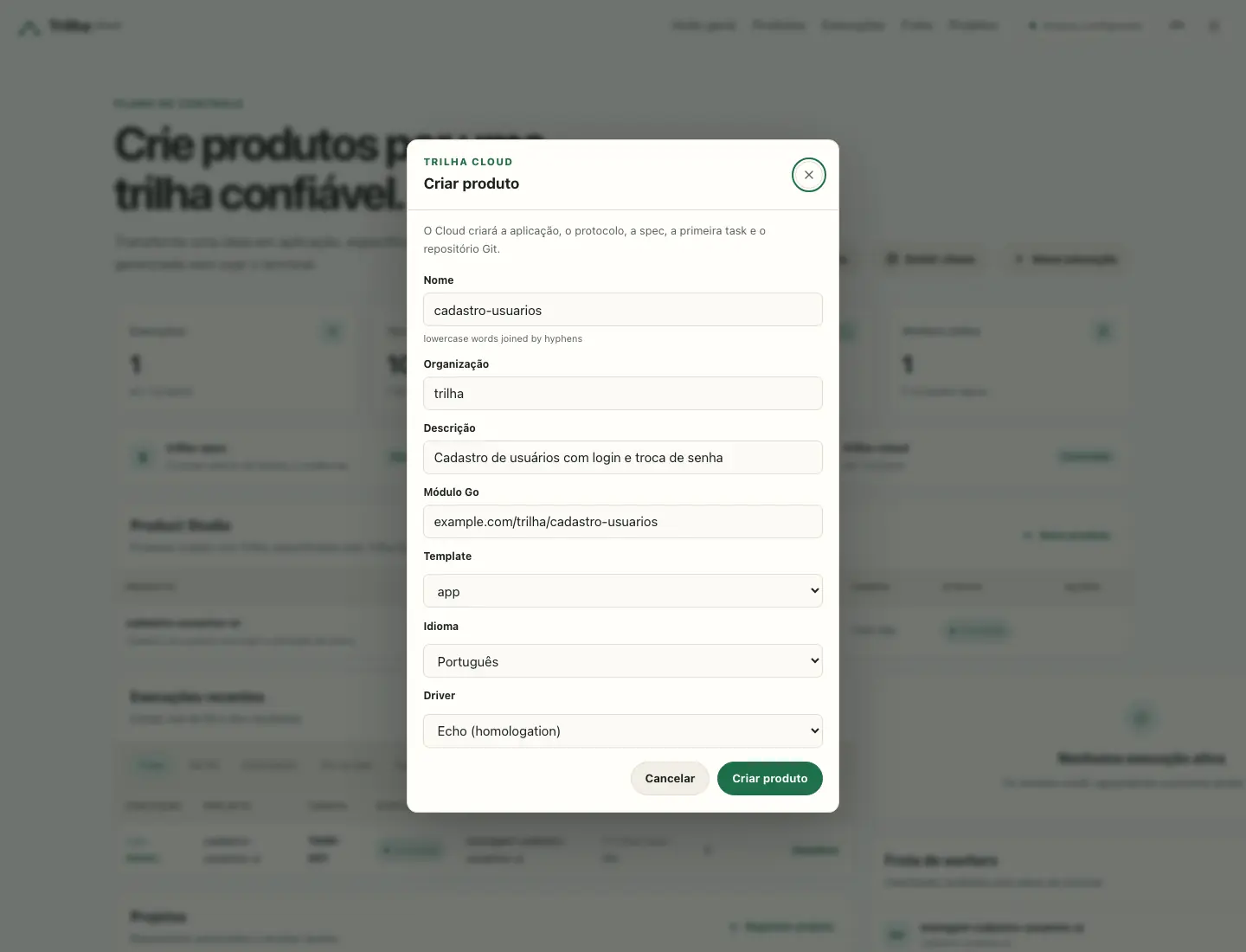
When Create product is selected, the Cloud performs fixed, auditable operations:
- Trilha generates the
appapplication, which already includes login, invitation, registration, profile and password change; - Trilha Spec initializes
.trilha/, writes the approved001-product-foundationspec and creates ready taskTASK-001; - the Cloud initializes Git and records the starting point;
- when Start build is selected, Trilha Runner opens the worktree, runs the task and returns branch, commit, log and evidence to Trilha Cloud.
For review, use Issue key with runs:read and runs:write, select Use in this session, open Details, and inspect every check. Approve completes review → done and records run.closed in the audit trail.
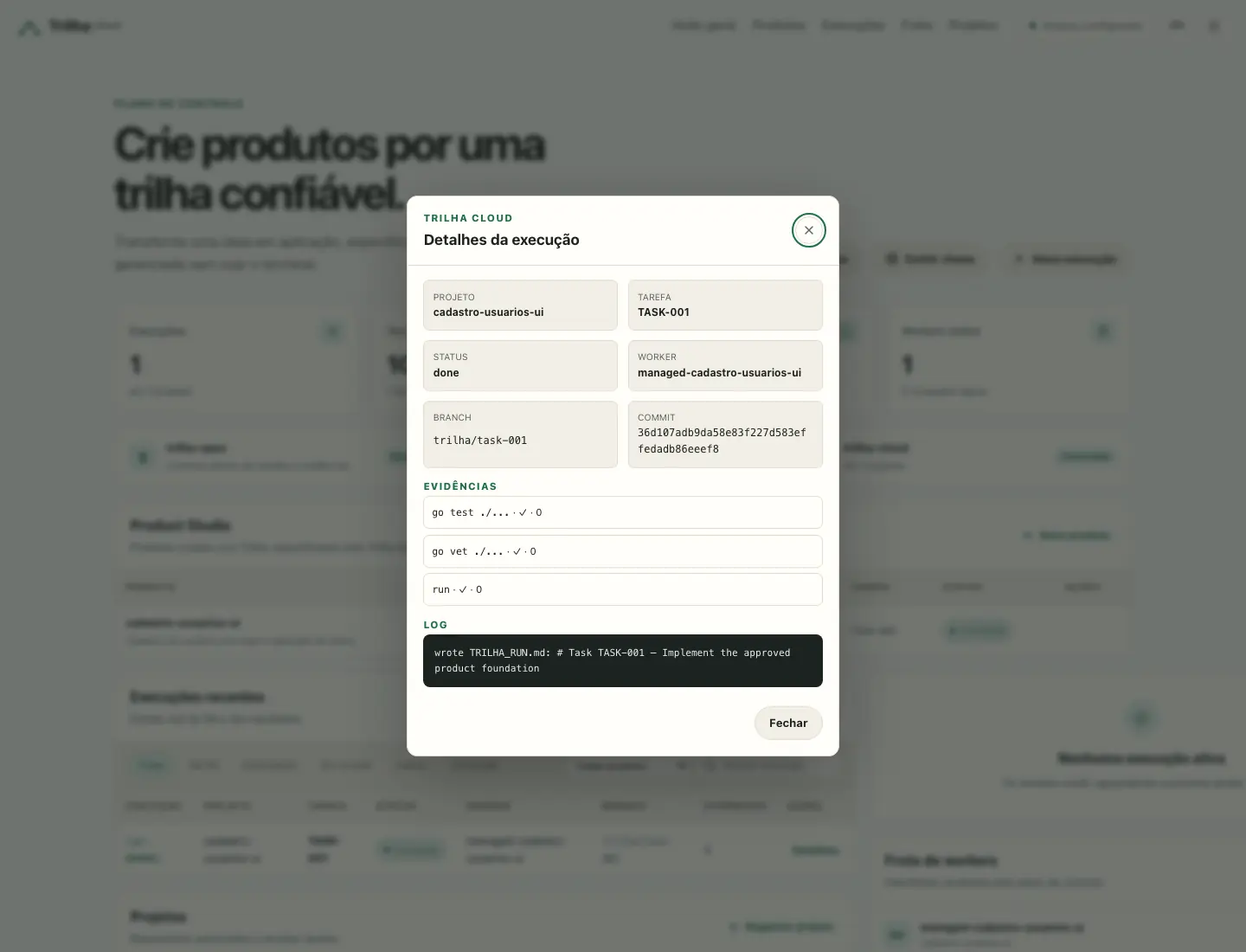
Managed mode is opt-in. Names are validated, every workspace must be a direct child of TRILHA_CLOUD_WORKSPACE_ROOT, user input is never evaluated by a shell, and Cloud secrets are removed from child-process environments. Only the provider credentials required by the AI driver reach the runner.
Operators can reproduce the same flow with:
make homologate-studio  # Trilha → Spec → Runner → Cloud → approval
make homologate-ui      # real portal flow in Chrome
make check-all          # security + ecosystem + Product Studio + UI
Tutorial: user registration from end to end#
This walkthrough creates a real Trilha application with its own login, user invitations and password changes; describes the work with trilha-spec; runs the task with trilha-runner; and uses trilha-cloud for the queue, evidence and approval. The Cloud receives run metadata, never the application's source code.
Use two sibling directories and three terminals: one for the Cloud, one for the app and one for the worker. The examples reserve localhost:3000 for the Cloud and localhost:3100 for the application.
1. Start and configure Trilha Cloud#
From an authorised checkout of the trilha-cloud repository:
cd trilha-cloud
mkdir -p data
export TRILHA_SECRET="$(trilha secret)"
export TRILHA_CLOUD_ADMIN_TOKEN='replace-with-an-admin-token'
export TRILHA_CLOUD_DATA="$PWD/data/cloud.json"
make dev
Open http://localhost:3000. Under Configure access, first enter the same TRILHA_CLOUD_ADMIN_TOKEN. The API key may stay empty until one is issued. Credentials remain in that browser's sessionStorage and are sent as Bearer tokens to the Cloud APIs.
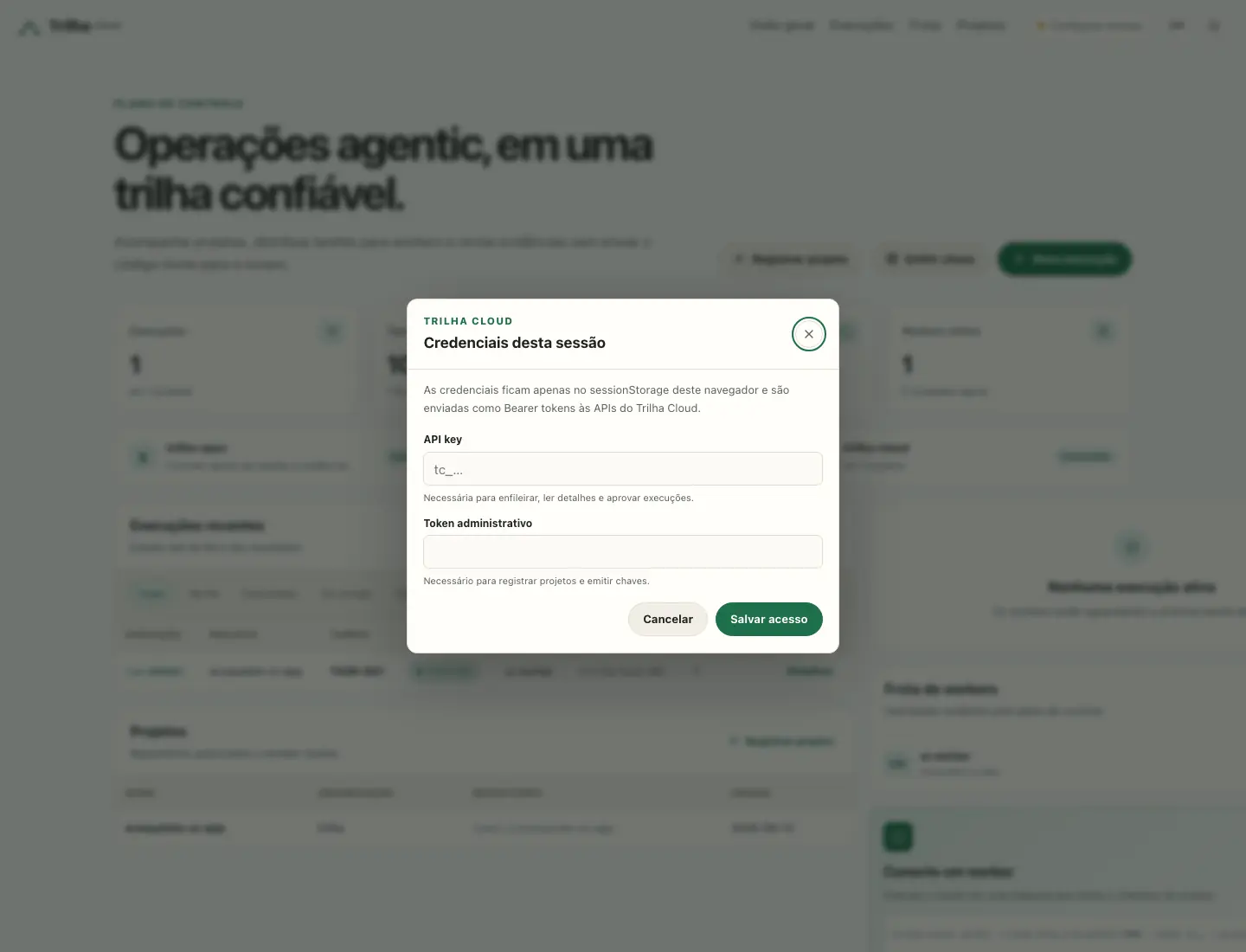
2. Generate the user registration application#
In another terminal, from the directory that will hold the project:
trilha new cadastro-usuarios \
  --module example.com/cadastro-usuarios \
  --template app \
  --lang pt \
  --agents
cd cadastro-usuarios
The app template already provides the flow being accepted:
| Route | Responsibility |
|---|---|
/entrar | checks e-mail and password and opens the session |
/admin/usuarios | lists people, assigns roles and issues invitations |
/convite/{token} | lets an invited person define the first password |
/perfil | changes the name, requests an e-mail change, changes the password and lists sessions |
/sair | closes the current session |
The central files are app/entrar/page.go, app/admin/usuarios/page.go, app/convite/token_/page.go and app/perfil/page.go. The first administrator is seeded from the environment:
export TRILHA_SECRET='use-a-secret-with-at-least-32-bytes'
export ADMIN_EMAIL='admin@example.com'
export ADMIN_PASSWORD='senha-segura-123'
3. Configure the make check gate#
trilha check runs the framework gates (gen, gofmt, vet, test, audit and, when a versioned document exists, openapi). A small Makefile keeps the CLI replaceable in CI without duplicating the policy:
TRILHA ?= trilha

.PHONY: check
check:
	$(TRILHA) check
Run the gate with the same variables used by the application:
TRILHA_SECRET="$TRILHA_SECRET" \
ADMIN_EMAIL="$ADMIN_EMAIL" \
ADMIN_PASSWORD="$ADMIN_PASSWORD" \
make check
To test another CLI version without editing the file:
make check TRILHA='go run github.com/emersonjoe/trilha/cmd/trilha@v0.123.0'4. Describe the delivery with trilha-spec#
Initialise the protocol and generate the spec:
trilha-spec init .
trilha-spec spec new "User registration and authentication"
Complete .trilha/project.md with the project commands and edit .trilha/specs/001-user-registration-and-authentication.md to record the problem, the change, what is out of scope and the acceptance criteria. Then generate an executable task:
trilha-spec task add "Validate registration login and password change" \
  --spec 001-user-registration-and-authentication \
  --agent coder \
  --accept "administrator can sign in" \
  --accept "administrator can invite a user" \
  --accept "invited user defines the first password and can sign in" \
  --accept "user can change their own password" \
  --check "go test ./..." \
  --check "make check"

trilha-spec task move TASK-001 ready
trilha-spec doctor
trilha-spec context TASK-001 --json
doctor validates the protocol structure. context shows the exact package the runner gives the agent: project, constitution, spec, task and agent profile.
5. Version the starting point#
The runner creates one worktree and branch per task, so it needs a Git repository with a clean commit:
git init
git add .
git commit -m "start user registration application"
6. Register the project in the portal#
In Trilha Cloud, select Register project and enter:
- Name:
cadastro-usuarios; - Organisation: your team's identifier, for example
trilha; - Repository: the Git URL or a local reference meaningful to the operator, for example
local:///workspace/cadastro-usuarios.
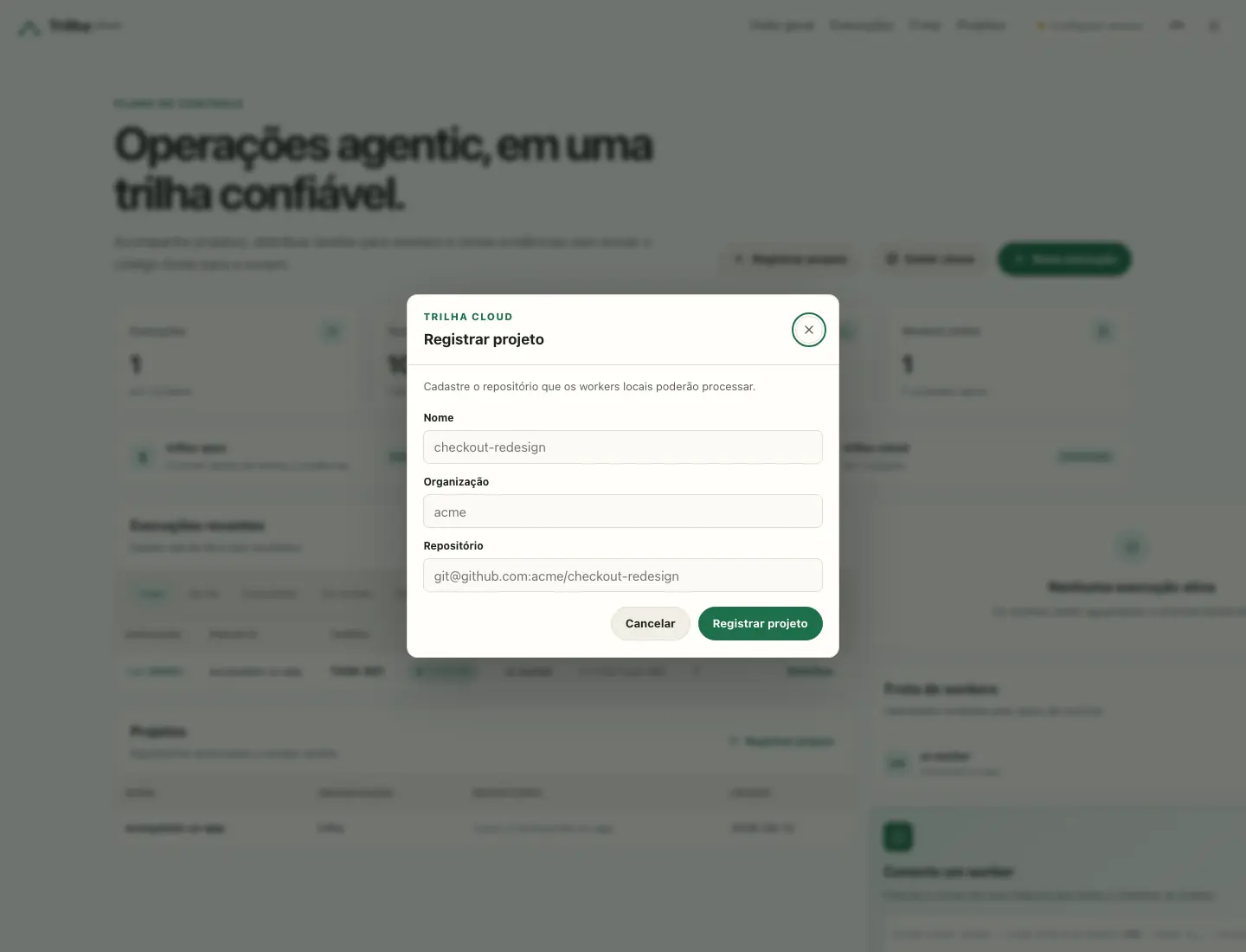
The same step can be automated:
curl -X POST http://localhost:3000/api/admin/projects \
  -H "Authorization: Bearer $TRILHA_CLOUD_ADMIN_TOKEN" \
  -H 'Content-Type: application/json' \
  -d '{"name":"cadastro-usuarios","org":"trilha","repo":"local:///workspace/cadastro-usuarios"}'
7. Add the worker#
In the Fleet section, select Add worker, choose cadastro-usuarios, name the worker cadastro-usuarios-worker and confirm. This issues a key scoped to runs:read and runs:write for that project — the same POST /api/admin/keys any key goes through — and shows, once, the install command built from the project you actually picked and the tc_… secret, each with its own copy button.
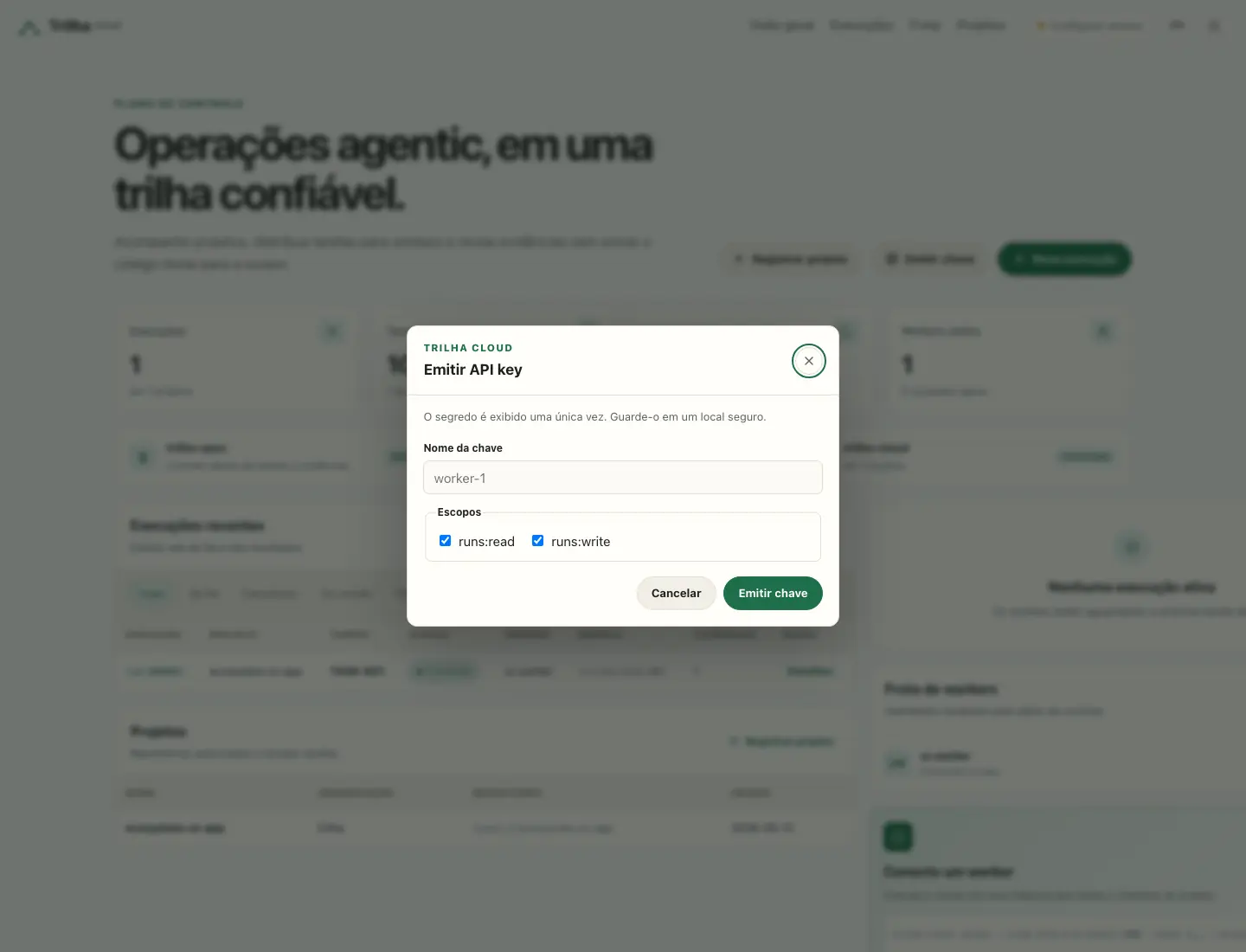
Paste the command on the machine that will run the worker — it installs trilha-runner, trilha-spec and the Claude Code CLI, creates a dedicated runner system user, generates a deploy key and waits for it to be added to the repository, clones the checkout and starts a hardened systemd service that keeps the worker running:
curl -fsSL http://localhost:3000/install/worker.sh -o worker.sh && sudo \
  TRILHA_CLOUD=http://localhost:3000 \
  TRILHA_PROJECT=cadastro-usuarios \
  TRILHA_REPO=git@github.com:trilha/cadastro-usuarios.git \
  TRILHA_WORKER_NAME=cadastro-usuarios-worker \
  bash worker.sh
# pastes the tc_… key when it asks — it is never a CLI argument
TRILHA_DRY_RUN=1 prints the same plan — the system user, worker.env's path, mode and owner, the systemd unit name, WorkingDirectory — without touching the host, requiring root, or asking for the token; it is the way to read what the script would do before running it for real. Two steps stay manual after it finishes: sudo -u runner -H claude auth login, and confirming the unit is up with systemctl status trilha-runner-cadastro-usuarios. Whatever the worker's own project needs — a database, an AI provider key — is that project's setup, not the installer's.
8. Queue the task#
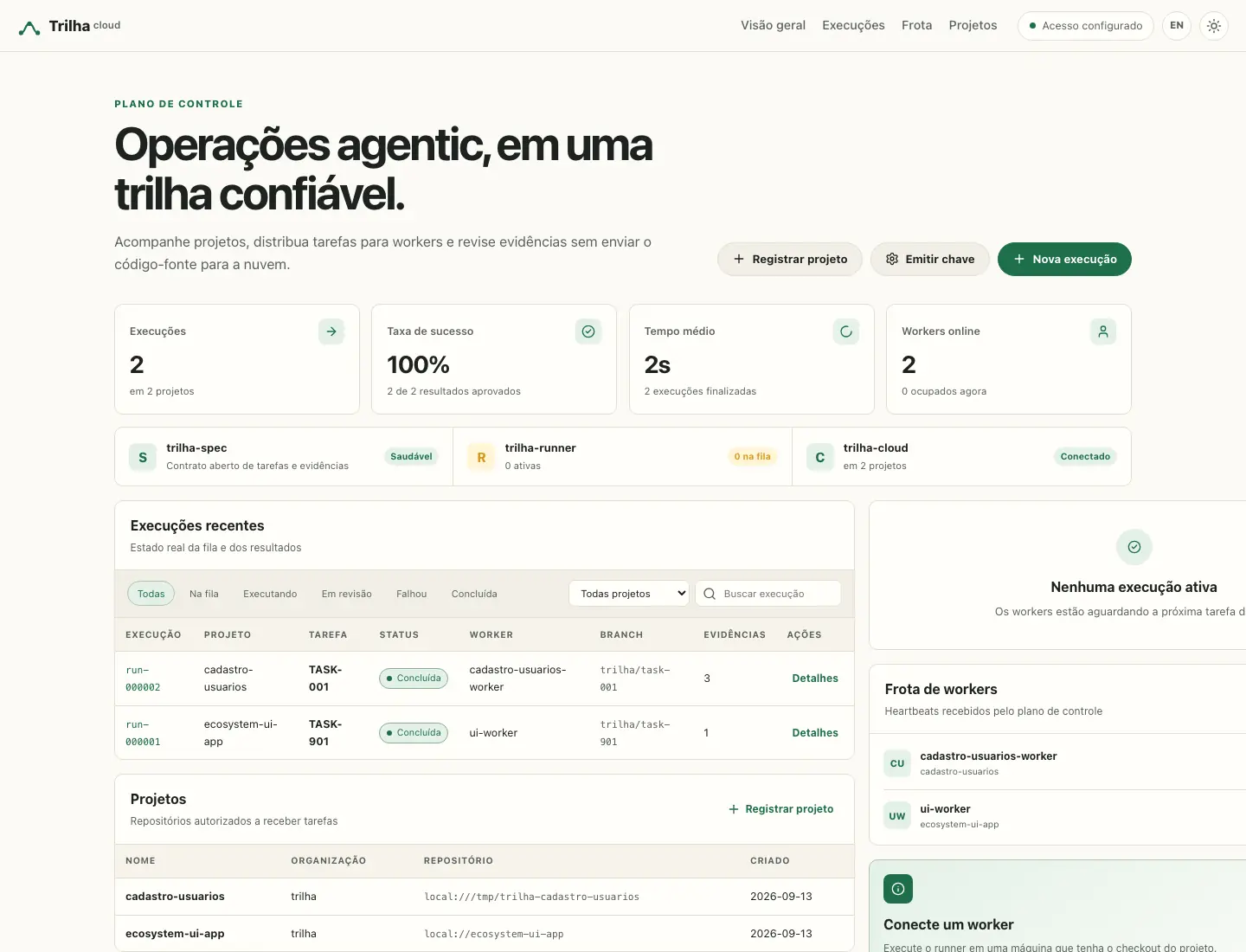
In the portal, select New run and choose cadastro-usuarios; the dialog fetches GET /api/projects/cadastro-usuarios/tasks and fills a picker with every task the repository's .trilha/tasks/ names, its status, and — for a task the server would refuse to queue — why: not yet ready, a run already in flight, or a dependency without a done run yet. Select TASK-001 and confirm. When several tasks are ready at once, Queue all ready submits each of them in sequence and reports how many were accepted and how many were refused, instead of one POST /api/runs at a time. A task not yet on the default branch has no entry in the picker; the dialog keeps a free-text "Other task…" field for it.
The same operation through the API:
export TRILHA_CLOUD_API_KEY='tc_…'
curl -X POST http://localhost:3000/api/runs \
  -H "Authorization: Bearer $TRILHA_CLOUD_API_KEY" \
  -H 'Content-Type: application/json' \
  -d '{"project":"cadastro-usuarios","task_id":"TASK-001"}'
The worker the installer started in step 7 picks this up on its own — watch it arrive under Details. To reproduce the same proof locally and deterministically, without an AI provider or the installed worker's own driver in the way, run a temporary worker in the foreground with the echo driver instead — this is what this tutorial's own acceptance uses:
cd cadastro-usuarios
TRILHA_SECRET="$TRILHA_SECRET" \
ADMIN_EMAIL="$ADMIN_EMAIL" \
ADMIN_PASSWORD="$ADMIN_PASSWORD" \
trilha-runner worker \
  --cloud http://localhost:3000 \
  --token "$TRILHA_CLOUD_API_KEY" \
  --project cadastro-usuarios \
  --workspace-root /var/lib/trilha-runner/workspaces \
  --repo git@github.com:trilha/cadastro-usuarios.git \
  --default-branch main \
  --push \
  --name cadastro-usuarios-worker \
  --once \
  --driver echo
The expected result is TASK-001 → review, a trilha/task-001 branch, a commit and passed evidence for go test ./... and make check. Open Details, inspect the commands, exit codes, branch, commit and log; only then select Approve.
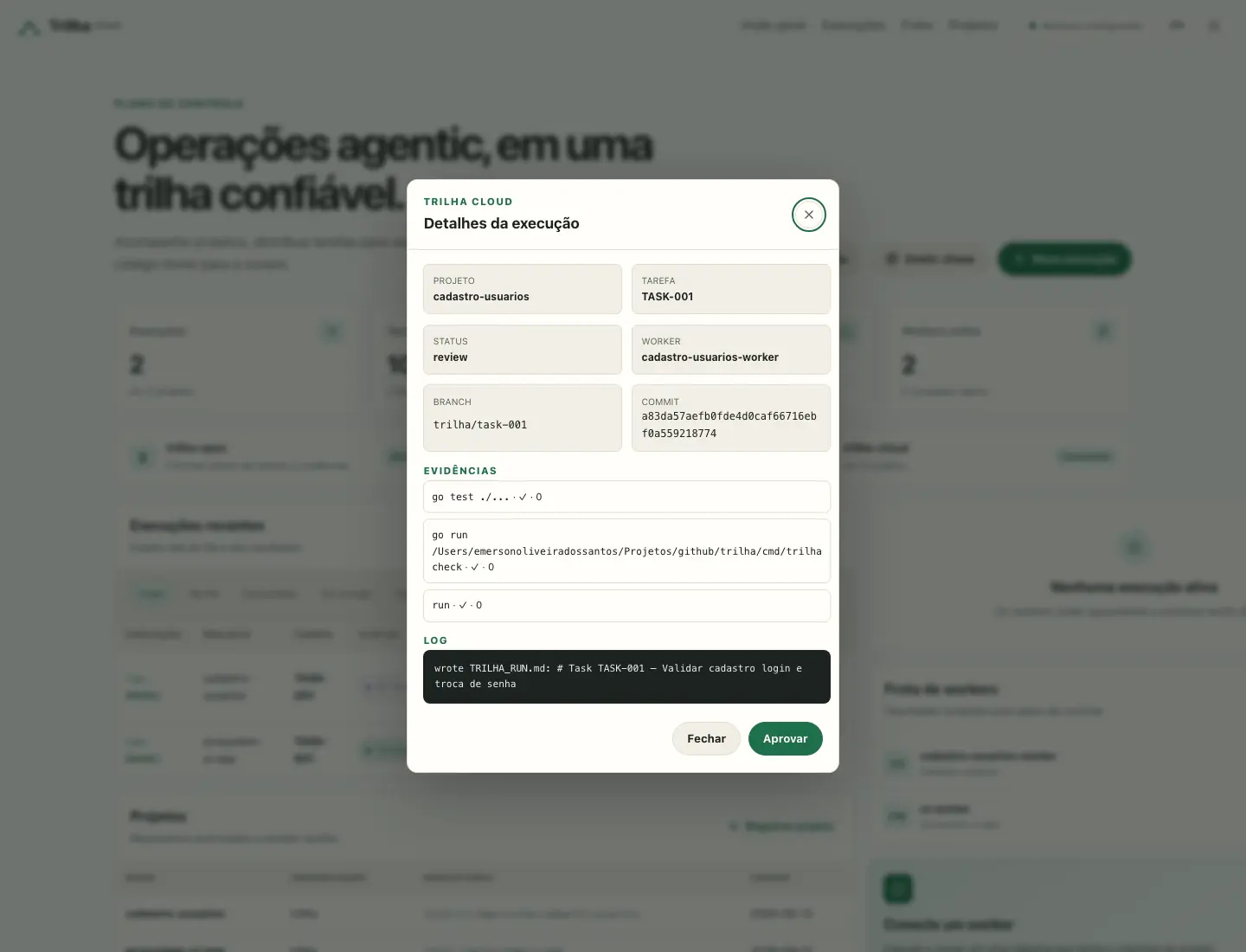
9. Test login, invitation registration and password change#
Start the application on a port different from the Cloud port:
cd cadastro-usuarios
TRILHA_SECRET="$TRILHA_SECRET" \
ADMIN_EMAIL="$ADMIN_EMAIL" \
ADMIN_PASSWORD="$ADMIN_PASSWORD" \
PORT=3100 trilha dev
Open http://localhost:3100/entrar and sign in with admin@example.com and senha-segura-123.
Open http://localhost:3100/admin/usuarios, enter the person's e-mail and name, then select Convidar. The person starts inactive and without a password; the administrator receives a temporary link instead of choosing the password for them.
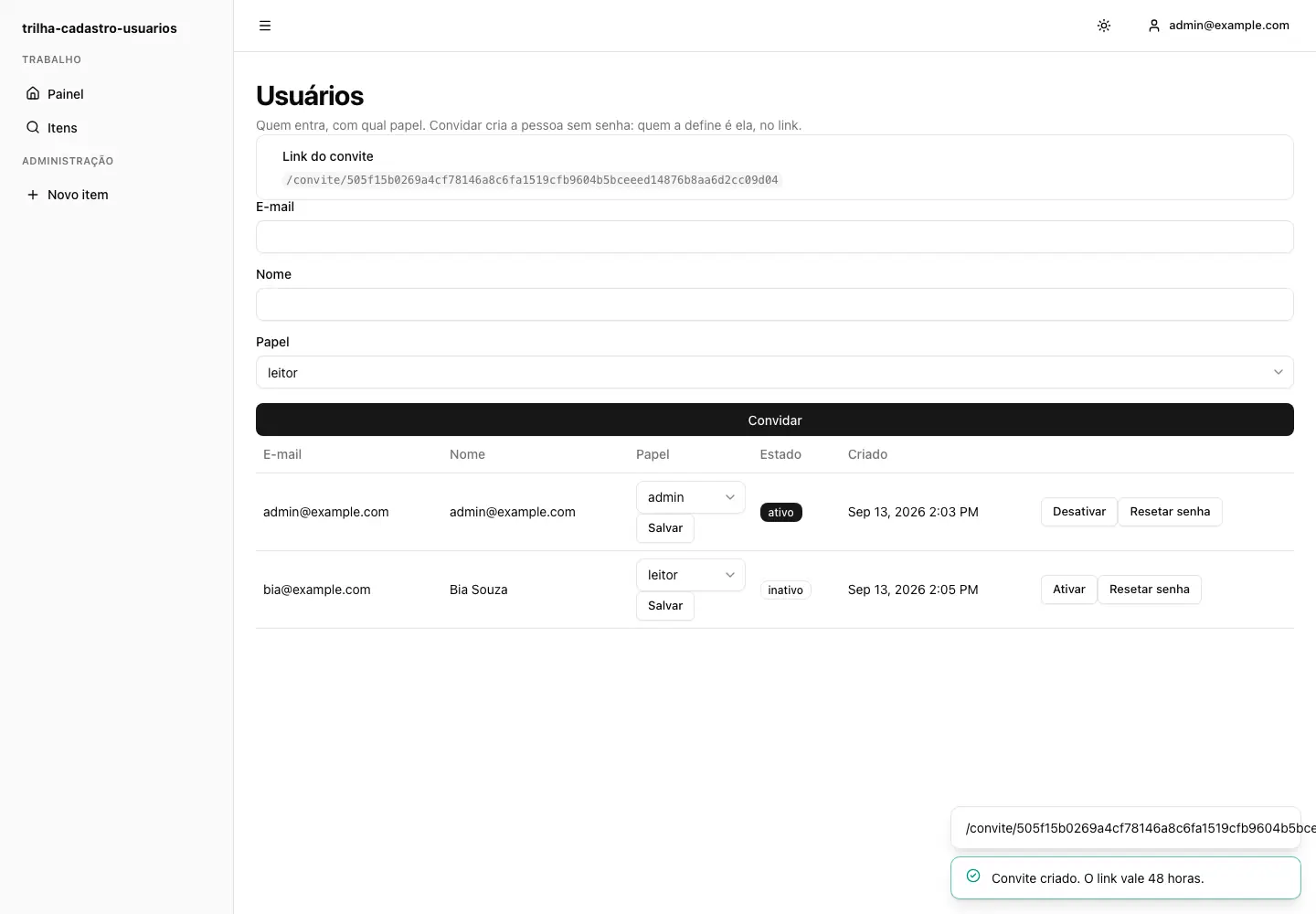
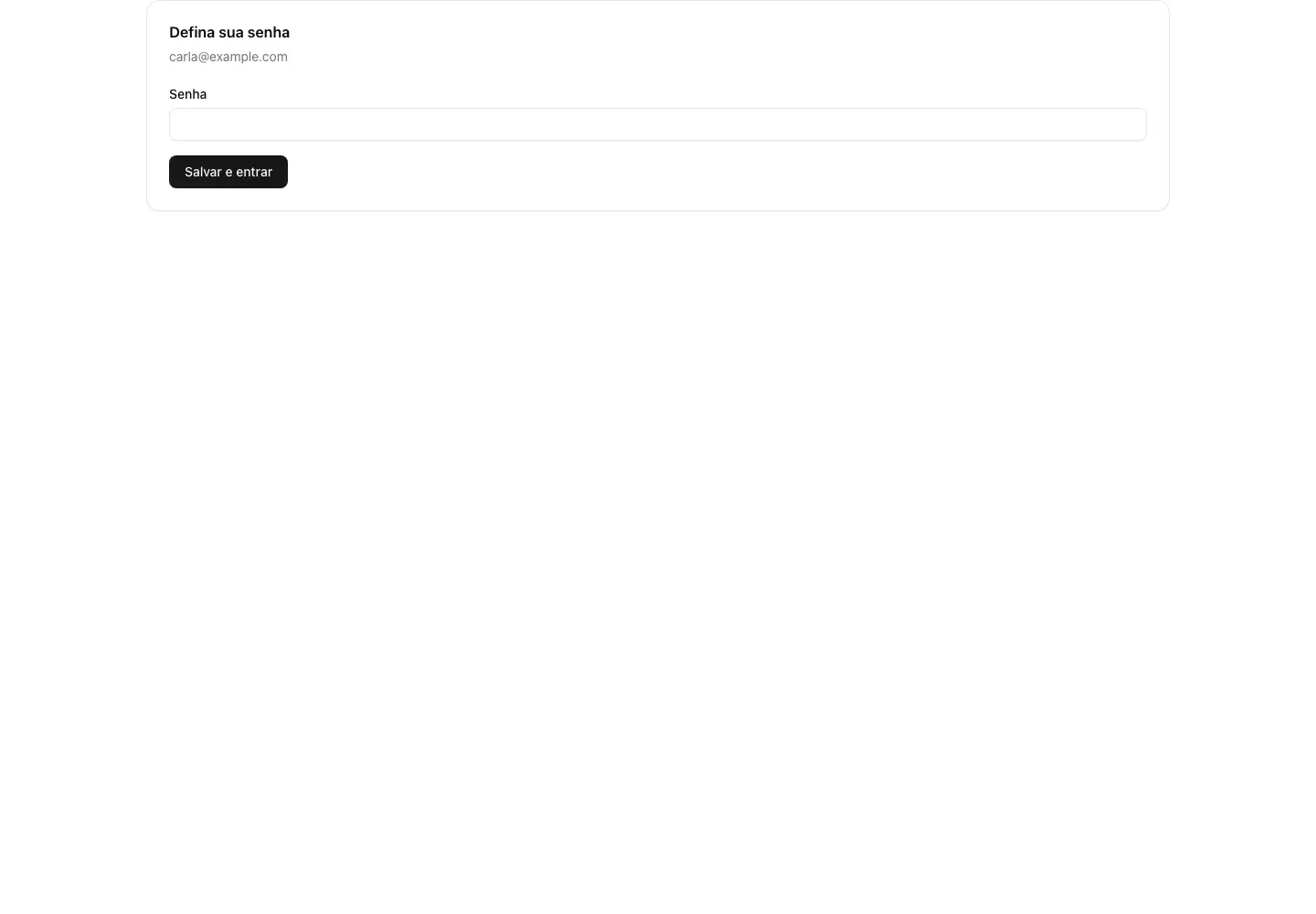
Open the /convite/{token} link in a private window. The invited person sets a password with at least 12 characters; the token is consumed, the account is activated and the browser returns to login.
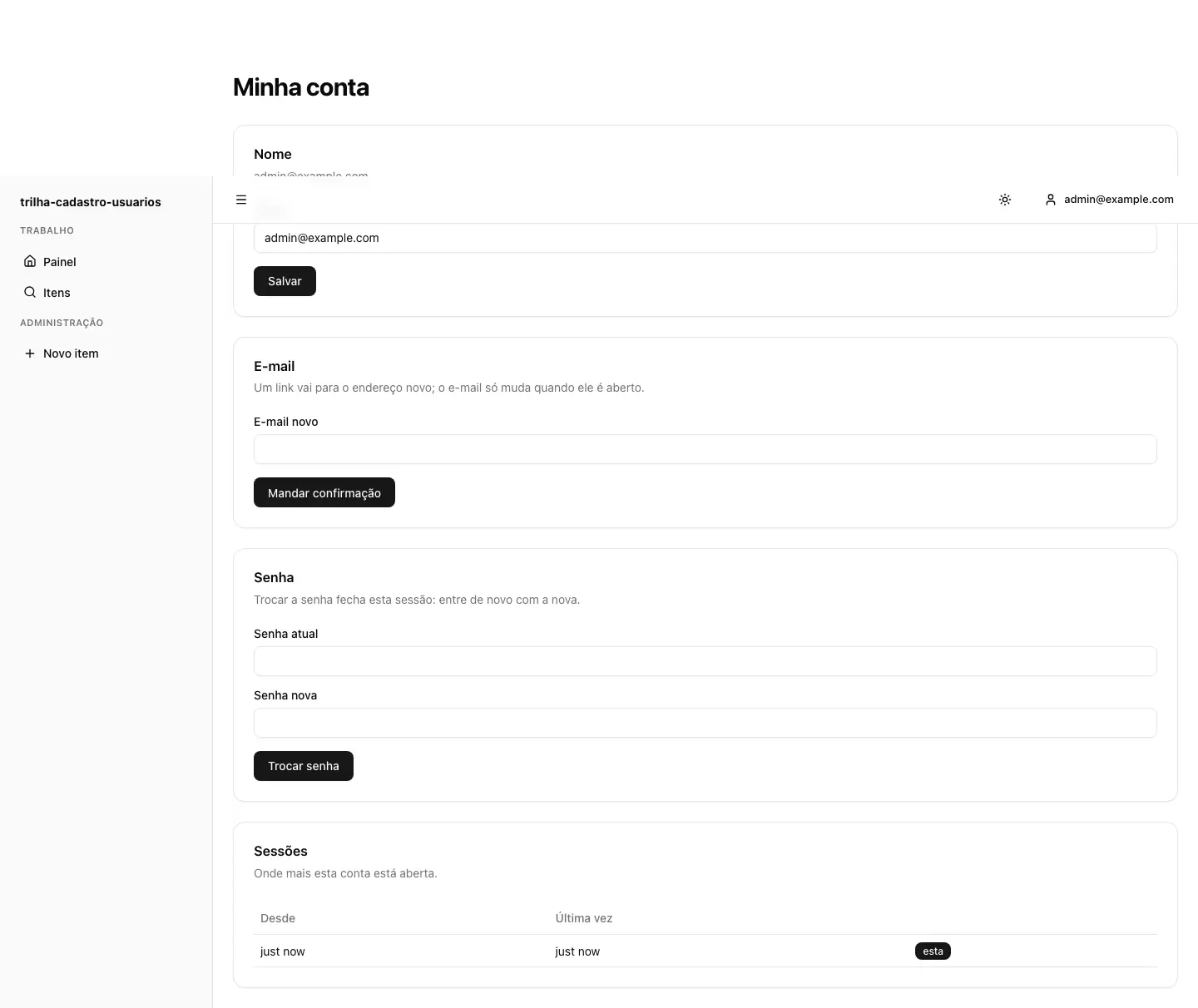
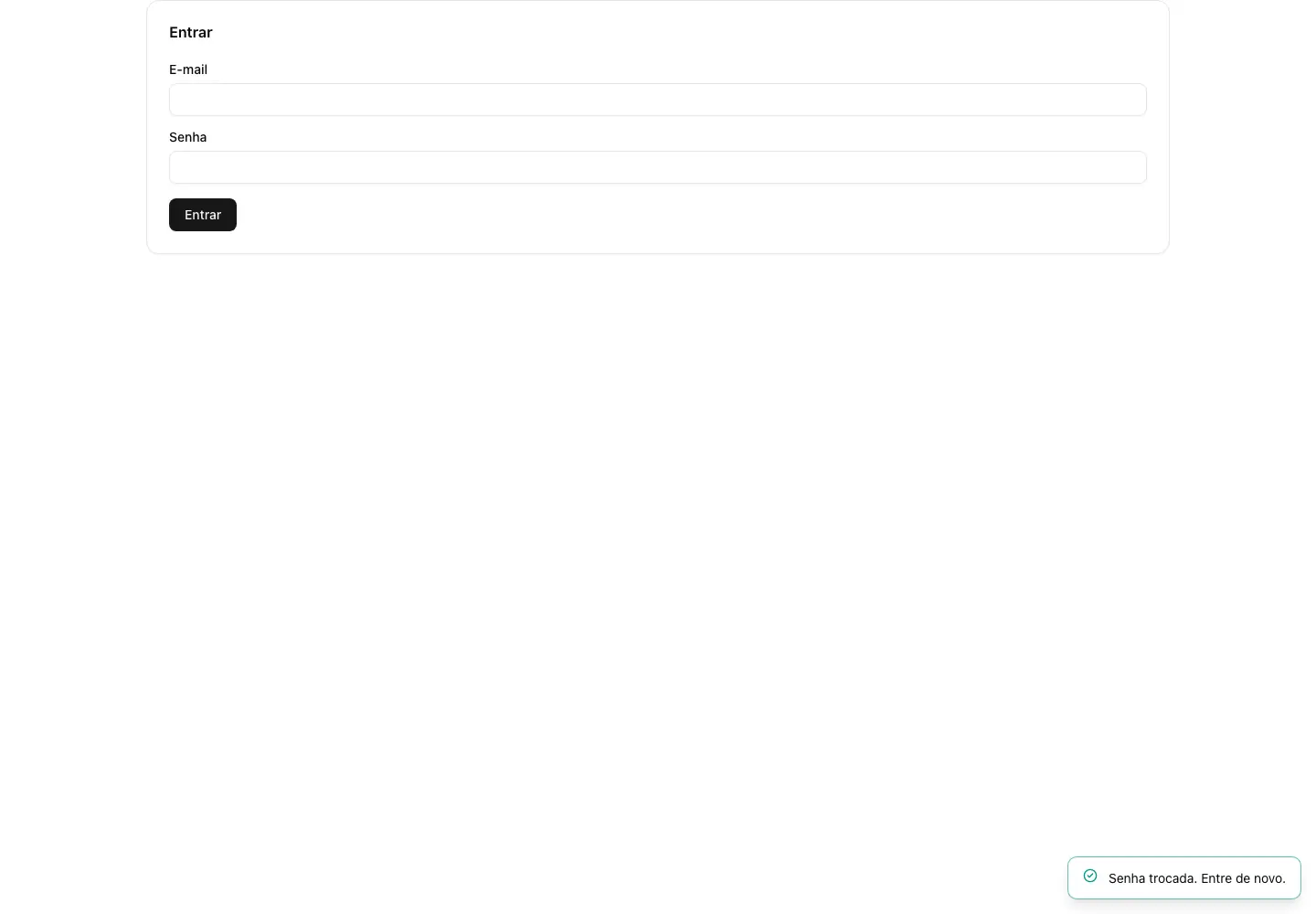
After signing in, open http://localhost:3100/perfil. In the Senha card, enter the current password and a new one. The application closes the sessions and requires a new login with the new password.
10. Limits of this example#
The template uses in-memory stores to keep the example small. Restarting the application removes users, invitations, sessions and password changes; the initial administrator is seeded again from the environment variables. Before production, replace those stores with real persistence, configure e-mail delivery for invitations and address changes, use HTTPS and keep secrets out of the repository.
To repeat the Cloud's own automated acceptance, including the headless browser, run this in the trilha-cloud repository:
make check-all11. Operate environments, secrets, deploy and rollback from the UI#
After the worker is connected, daily operation requires no terminal:
- In Specs, select Run on a ready task. Cloud gives the runner a versioned bundle with the repository, round, stages, acceptance criteria and checks.
- The runner refreshes a dedicated checkout, materializes
.trilha/through Trilha Spec, executes the task in a worktree and publishestrilha/spec-*andtrilha/task-*branches when--pushis enabled. - In Environments, create
production, enter its HTTPS URL and a runner-local allowed profile such asproduction. - In Secrets, enter one variable per line (
NAME=value). Cloud stores AES-256-GCM ciphertext and subsequently displays names only. - Select Deploy, enter an immutable commit or tag and follow its status. After success, Rollback schedules the previous revision.
The delivery profile exists only on the VPS in /etc/trilha-runner/delivery.json:
{"profiles":{"production":{"deploy":["/usr/local/libexec/trilha/deploy-product"],"rollback":["/usr/local/libexec/trilha/rollback-product"],"health_url":"https://cadastro-usuarios.eoslab.com.br/health/ready","timeout_seconds":600}}}Cloud does not send commands, Git keys or Docker socket access. The service runs as a dedicated user without sudo, receives a minimal environment and redacts secret values from returned logs.
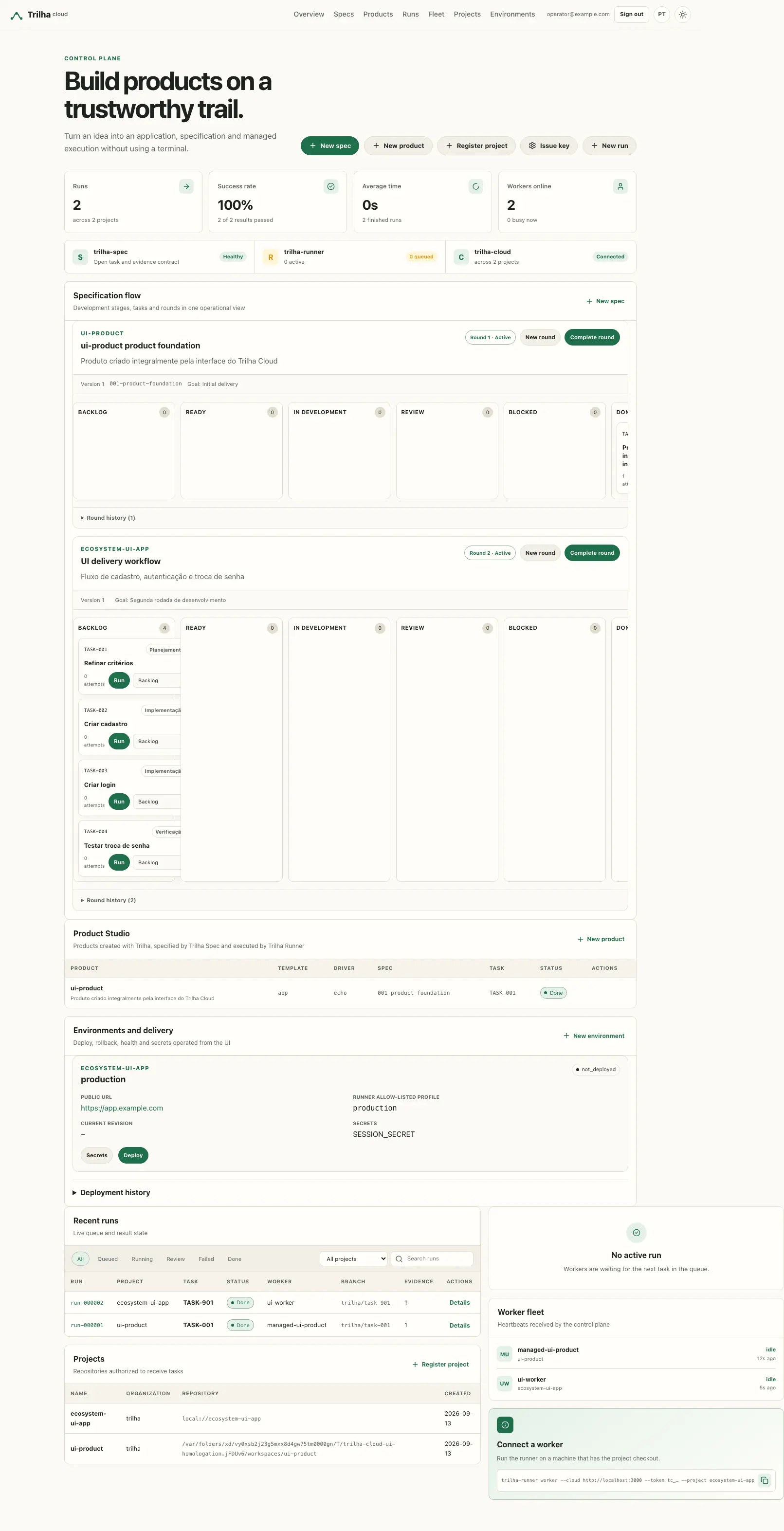

12. Pause a project and let the circuit breaker pull the brake#
Cancelling stops one run. Pausing stops one project: queued runs stay queued in the same order, workers keep sending heartbeats, and POST /api/runs/next answers 204 for that project until a human resumes it. Managed runs started from Specs are refused with 409 while paused.
- In Projects, select Pause on the project. The dialog asks for a reason (up to 240 characters) and a confirmation; the reason goes to the audit trail and is what the next operator reads before resuming.
- The row shows the Paused badge, the reason, who paused and when. The product's Overview page shows the same in the Fleet brake panel.
- Select Resume and confirm. The queue is delivered again in the same order. Resuming is always a human decision; nothing resumes a project automatically.
The same brake, from the API:
curl -sS -X POST "$CLOUD/api/admin/projects/cadastro-usuarios/pause" \
  -H "Authorization: Bearer $TRILHA_CLOUD_ADMIN_TOKEN" -H 'Content-Type: application/json' \
  -d '{"reason":"spec 004 changes the schema; hold until it is reviewed"}'

curl -sS -X POST "$CLOUD/api/admin/projects/cadastro-usuarios/resume" \
  -H "Authorization: Bearer $TRILHA_CLOUD_ADMIN_TOKEN"
Both routes need the admin token or an operator session. A worker key — even one with runs:write — gets 403: the worker delivers work, it does not decide whether the fleet works.
The circuit breaker pauses the project by itself when the numbers say it is burning money. In the product's Overview, open Configure circuit breaker and set the thresholds you want; zero disables one:
| Threshold | Trips when |
|---|---|
max_cost_per_hour | the estimated cost of attempts finished in the last hour exceeds it |
max_failure_rate | over the last failure_window finished runs (default 10) the failed fraction exceeds it; it waits for a full window |
max_repeated_failure_class | this many attempts in a row failed with the same failure_class |
curl -sS -X PUT "$CLOUD/api/admin/projects/cadastro-usuarios/breaker" \
  -H "Authorization: Bearer $TRILHA_CLOUD_ADMIN_TOKEN" -H 'Content-Type: application/json' \
  -d '{"max_cost_per_hour":5,"max_failure_rate":0.5,"failure_window":10,"max_repeated_failure_class":3}'
When a threshold is crossed, the project is paused with the reason breaker:<threshold> and paused_by: circuit breaker; a human cannot write a reason that starts with breaker:, so the trail never lies about who pulled the brake. The project.paused audit record carries the limit, the measured value and the signals of that moment (cost_last_hour, failure_rate, repeated_failure_class), the same numbers the Fleet brake panel and GET /api/admin/products/{name}/metrics show. Every pause, resume and threshold change is in GET /api/admin/audit.
13. Evidence beyond the exit code: evals, attestations and quorum#
A check that exits 0 proves the command ran. It does not prove the model is still accurate, nor that the people who must sign off did. Three things close that gap.
Evals with a threshold. An evidence record with kind: "eval" carries the metric in meta. The runner reports it like any other evidence; the Cloud applies the gate on POST /api/runs/{id}/result and marks the run failed when the value misses the threshold, whatever passed the worker declared:
{"kind":"eval","task":"TASK-002","seq":2,"passed":true,
 "meta":{"metric":"triage_top1","value":"0.71","threshold":"0.85","comparator":">="}}
The run ends with failure_class: eval_below_threshold, error_code: EVAL_BELOW_THRESHOLD and the message eval below threshold: triage_top1=0.71 >= 0.85. Comparators: >= (default), >, <=, <, ==.
A review policy with quorum. Decide how many attestations, from which roles, and whether they must be signed:
curl -sS -X PUT "$CLOUD/api/admin/projects/cadastro-usuarios/review" \
  -H "Authorization: Bearer $TRILHA_CLOUD_ADMIN_TOKEN" -H 'Content-Type: application/json' \
  -d '{"quorum":2,"roles":["uat"],"require_signature":true}'
From now on DELETE /api/runs/{id} answers 409 control: review quorum is incomplete: 0 of 2 attestations, missing roles uat until the quorum is met. GET /api/runs/{id}/quorum shows who attested and what is missing.
Signed attestations. Each reviewer has an Ed25519 key pair; the public key is registered in the project (POST /api/admin/projects/{name}/attestation-keys with {id, public_key, owner}, base64 of the 32-byte key). The signature covers the canonical JSON {"at":…,"by":…,"role":…,"run":…,"statement":…,"task":…} with sorted keys, so a signature never fits another run:
curl -sS -X POST "$CLOUD/api/runs/$RUN/attest" \
  -H "Authorization: Bearer $WORKER_KEY" -H 'Content-Type: application/json' \
  -d '{"by":"maria","role":"uat","statement":"Accepted in UAT on 2026-09-18",
       "at":"2026-09-18T14:00:00Z","key_id":"uat-maria","signature":"<base64>"}'
An unsigned attestation is accepted only from an operator session in the browser; a key without a signature gets 403 and an audit record run.attestation_refused. One attestation per (by, role).
Trend and export. The spec board shows a per-round chart (tasks done, checks passed, evals within threshold, the average of each metric) rendered as SVG on the server; the same numbers come from GET /api/admin/specs/{id}/trend. For an auditor, GET /api/admin/projects/{name}/evidence?format=csv&spec=<id> downloads the evidence and attestation rows exactly as the screen lists them (format=json for machines).
Metrics and alerts. Start the Cloud with TRILHA_METRICS=/_trilha/metrics and, in production, TRILHA_OBS_TOKEN_FILE pointing to a 32+ byte secret. Prometheus scrapes trilha_cloud_runs{status}, trilha_cloud_queue_age_seconds{project}, trilha_cloud_breaker_open{project}, trilha_cloud_workers{state}, trilha_cloud_worker_last_seen_seconds{worker,project} and trilha_cloud_runs_awaiting_quorum. deploy/eoslab/compose.observability.yml brings Prometheus and Grafana with versioned rules: a worker silent for five minutes fires TrilhaWorkerStopped, an open breaker fires TrilhaBreakerOpen, a queue older than fifteen minutes fires TrilhaQueueAging.
14. Let GitHub drive the round: App, signed webhooks and the way back#
Until now the Cloud only spoke to GitHub on the way out, with a PAT. A round that starts from an issue and ends with that issue closed needs the other direction too, signed.
A GitHub App instead of a PAT. Create an App in your organization with Issues: Read and write, Pull requests: Read and write, Checks: Read and Contents: Read, install it on the repository, download its private key and hand the three values to the project. From then on every call to GitHub uses a short-lived installation token minted from an RS256 JWT; the PAT, if any, is only the fallback:
curl -sS -X PUT "$CLOUD/api/admin/projects/cadastro-usuarios/github/app" \
  -H "Authorization: Bearer $TRILHA_CLOUD_ADMIN_TOKEN" -H 'Content-Type: application/json' \
  -d "{\"app_id\":12345,\"installation_id\":67890,\"private_key\":$(jq -Rs . < app.pem)}"
The key is sealed in the snapshot and never answered. The audit records github.app_configured.
A secret for the webhook. Choose one with at least 16 characters and register it on both sides — the project and the repository's webhook (Settings → Webhooks, content type application/json, events Issues, Pull requests, Check runs, Pushes, URL https://<your-cloud>/api/github/webhook):
curl -sS -X PUT "$CLOUD/api/admin/projects/cadastro-usuarios/github/webhook" \
  -H "Authorization: Bearer $TRILHA_CLOUD_ADMIN_TOKEN" -H 'Content-Type: application/json' \
  -d '{"secret":"'"$(openssl rand -hex 24)"'"}'
That route has no bearer token: each delivery is authenticated by X-Hub-Signature-256, the HMAC GitHub computes with the secret, verified in constant time against the project registered for repository.full_name. A wrong signature or an unknown repository gets 401 and an audit record github.webhook_rejected; a repeated X-GitHub-Delivery is answered {"status":"duplicate"} and does nothing. GET .../github/webhook lists what arrived and what each delivery did.
What each event does.
issueswith the labelready-for-agentbecomes areadytask in the active round (the task already linked to the issue, or a newTASK-nnnin the last stage). Labelling it again changes nothing.pull_requestopened on the branch the runner reported (trilha/task-002) is linked to that run:GET /api/runs/{id}now showspull_requestwith number, URL, state and head, and the PR receives one status comment per transition, not per event.check_runcompleted becomes acheckevidence record on the run —github:check_run:CI / test, passed when the conclusion issuccess— without touching the verdict. Only the reviewer moves a run todone.pushrecords the last commit on the project.
The way back. When the reviewer closes the run (DELETE /api/runs/{id}), the Cloud comments the issue with the evidence summary — run, branch@commit, the table of checks, evals and attestations — closes it, and comments the pull request one last time. In the audit: github.issue_closed, github.pr_commented.
Your own subscribers. The Cloud emits signed webhooks for task.ready, run.finished, run.closed, pull_request.linked, check.recorded, deployment.finished, project.paused and project.resumed:
curl -sS -X POST "$CLOUD/api/admin/webhooks" \
  -H "Authorization: Bearer $TRILHA_CLOUD_ADMIN_TOKEN" -H 'Content-Type: application/json' \
  -d '{"url":"https://ci.example.com/trilha","events":["run.closed","check.recorded"],"label":"ci"}'
The answer carries the secret once; verify X-Webhook-Signature (HMAC of X-Webhook-Timestamp and the body) on your side. Failed deliveries are retried with backoff and then wait in GET /api/admin/webhooks/deliveries?state=failed; POST /api/admin/webhooks/deliveries/{id}/retry sends the same bytes again.
15. Put the state in Postgres: migration, backup and a rehearsed restore#
Everything so far lived in one JSON file rewritten on every write. That is fine for a workstation; for a control plane whose evidence is the record of what an agent did, it is one crash away from losing the last minute. The store is the seam: switch the backend and no route notices.
Point the Cloud at a database. In development the URL may be in the environment; file: opens SQLite, postgres:// opens Postgres. In production it must come from a file with mode 0600; a plain TRILHA_CLOUD_DATABASE_URL is refused:
export TRILHA_CLOUD_DATABASE_URL='postgres://trilha:…@localhost:5432/trilha_cloud?sslmode=disable'
make dev
On start the Cloud applies migrations/*.sql under an advisory lock and writes a receipt with the file's checksum; a migration edited after it was applied stops the start. From then on each mutation is one transaction holding only the rows that changed, the sealed secrets sit in their own table and the audit trail is append-only. /_trilha/health/ready includes a database ping.
Bring the file along. Stop the Cloud, run the migrator with the same TRILHA_SECRET (the snapshot holds sealed values), start it again on the database:
go run ./cmd/cloud-migrate -from ./data/cloud.json -to "$TRILHA_CLOUD_DATABASE_URL"migrated ./data/cloud.json in 13ms: projects=1 products=0 specifications=1 runs=1 workers=0 api_keys=1 environments=0 deployments=0 audit=42Run it twice and the second line is the same: every row is upserted by id. The file is never touched, so the rollback is to point TRILHA_CLOUD_DATA at it again.
Back up and restore. In deploy/eoslab, a secrets/postgres_password file is enough for deploy.sh to add Postgres on an internal network and a sidecar that writes a daily pg_dump into backups/, keeping TRILHA_CLOUD_BACKUP_KEEP_DAYS of them. A backup that was never restored is a hope, not a backup, so the runbook records a drill: from a clean Postgres to the Cloud answering run-000001 from the dump, the mechanical part took 4.1 seconds, and the objectives are written down as RPO ≤ 24 h and RTO ≤ 15 min of operator time. Do your own drill and write your time next to it.
Forget on purpose. Old runs and their captured output are the bulk of the state. Retention is an operator's call, behind the admin token, with a window of at least a week:
curl -sS -X POST "$CLOUD/api/admin/retention" \
  -H "Authorization: Bearer $TRILHA_CLOUD_ADMIN_TOKEN" -H 'Content-Type: application/json' \
-d '{"older_than_days": 90}'{"before":"2026-06-20T12:00:00Z","runs_deleted":3,"runs_compacted":1,"output_bytes_dropped":250,"audit_pruned":3,"github_deliveries_dropped":0,"hook_deliveries_dropped":0}For everything finished before the window: an attempt that was superseded by a later one is deleted; the newest run of each task keeps status, verdict, branch, commit and every evidence record with its digest, losing only the captured output; delivery logs and, on Postgres, old audit rows go. A task that reached done never loses the record of how. The audit keeps retention.compacted with these counts.
16. Give each project its own model, its rules and its bill#
Until now every project's runs used one global credential and any worker took the oldest run in the queue. A fleet that serves several projects needs to know, per project, which model may run its tasks, where the data may go, who may execute it and how much it has already cost. None of this touches the code; all of it goes through the store and is audited.
Register a provider with its region, then point the project at it. The credential is sealed at rest and only ever travels inside the claim a worker receives:
curl -sS -X POST "$CLOUD/api/admin/ai/providers" \
  -H "Authorization: Bearer $TRILHA_CLOUD_ADMIN_TOKEN" -H 'Content-Type: application/json' \
  -d '{"id":"gateway-br","kind":"compatible","endpoint":"https://ai.example.com.br/v1","model":"gpt-5","region":"br","credential":"sk-…"}'
curl -sS -X PUT "$CLOUD/api/admin/projects/app/ai" \
  -H "Authorization: Bearer $TRILHA_CLOUD_ADMIN_TOKEN" -H 'Content-Type: application/json' \
  -d '{"provider_id":"gateway-br","driver":"openai-compatible"}'
The driver decides what the runner does with it. openai-compatible hands it a base URL, key and model. claude-code hands it the project's key and the runner invokes the Claude Code CLI with ANTHROPIC_API_KEY (or CLAUDE_CODE_OAUTH_TOKEN for a provider whose auth_mode is oauth), under the same environment allow-list and output redaction the runner applies to every driver. The key never appears in the run's output or in the audit.
Write the policy down. A policy says which providers a project may use, where its data must stay, which labels a worker must advertise and how much the project may spend:
curl -sS -X PUT "$CLOUD/api/admin/projects/app/policy" \
  -H "Authorization: Bearer $TRILHA_CLOUD_ADMIN_TOKEN" -H 'Content-Type: application/json' \
  -d '{"data_residency":"br","allowed_providers":["gateway-br"],"required_labels":["region:br"],"cost_ceiling":25}'
The policy is checked twice: when the provider is configured and on every enqueue, so changing either one later cannot let a run slip through. Point the project at a provider in another region and both answers are the same:
HTTP 422 control: policy data_residency: provider "openai-us" is in region "us" (api.openai.com), the project requires "br"and the audit gains policy.refused with the rule, the provider and where it was caught.
Let the scheduler choose. Enqueue with what matters, a deadline or a priority:
curl -sS -X POST "$CLOUD/api/runs" -H "Authorization: Bearer $KEY" -H 'Content-Type: application/json' \
  -d '{"project":"app","task_id":"TASK-002","deadline":"2026-10-01T00:00:00Z","priority":10}'
A worker that advertises --label region:br --capacity 2 claims the run with the earliest deadline among those whose labels it has, then the highest priority, then the oldest. A worker in another region gets 204, not the run; a worker whose running equals its capacity gets 204 as well. Two workers with different labels can serve the same project and never take each other's work.
Read the bill. The runner reports model, tokens and estimated cost for every attempt. The Cloud sums them:
curl -sS "$CLOUD/api/admin/cost?project=app" -H "Authorization: Bearer $TRILHA_CLOUD_ADMIN_TOKEN"{"projects":[{"project":"app","org":"acme","runs":1,"attempts":1,"tokens":1200,"cost":0.42,"by_model":{"gpt-5":0.42},"ceiling":25}],
"organizations":[{"org":"acme","projects":1,"runs":1,"tokens":1200,"cost":0.42}]}The Cost column of the projects panel shows the same number. When a project crosses its cost_ceiling, the circuit breaker from chapter 12 pauses it with the reason breaker:cost_ceiling; nothing more is claimed until an operator resumes it. The bill is not a payment, it is evidence: the same attempts the runner wrote down, added up.
17. Promote a multi-service stack: migration first, a second person, a report#
Chapter 11 deployed one service with one profile. A real product is a stack: an API, a web front, a worker, Postgres and an AI gateway from one compose file, with a schema migration that must run before traffic moves and must never run in production what staging did not see. The Cloud still stores no command; it stores where each environment lives, what it may receive, who has to agree and what each deploy did.
Give the profile a migration and a health check per service. On the runner host, in /etc/trilha-runner/delivery.json, a compose profile has fixed steps, a migrate block and one health URL per service:
{"profiles":{"compose":{
  "steps":[{"name":"pull","argv":["docker","compose","-f","docker-compose.prod.yml","pull"],"on_fail":"abort"},
           {"name":"switch","argv":["docker","compose","-f","docker-compose.prod.yml","up","-d","--wait"],"on_fail":"abort"}],
  "migrate":{"argv":["docker","compose","-f","docker-compose.prod.yml","run","--rm","api","alembic","upgrade","head"],
             "downgrade":["docker","compose","-f","docker-compose.prod.yml","run","--rm","api","alembic","downgrade","-1"],
             "reversible":false},
  "rollback":["/usr/local/libexec/trilha/rollback-compose-image"],
  "health":[{"name":"api","url":"https://acervo.example.com.br/health/ready","timeout_seconds":60},
            {"name":"web","url":"https://acervo.example.com.br/","timeout_seconds":60}],
  "timeout_seconds":900}}}
The migration runs before switch. If it fails, the deploy aborts and the previous image keeps serving. reversible: false tells the runner that a rollback restores the previous image and leaves the schema alone; set it to true only for a release whose downgrade was rehearsed.
Put staging and production in a region, and make production promote staging. An environment now carries region, data_residency, the environment it promotes from, whether a second person must approve and a deploy window:
curl -sS -X POST "$CLOUD/api/admin/environments" -H "Authorization: Bearer $TRILHA_CLOUD_ADMIN_TOKEN" -H 'Content-Type: application/json' \
  -d '{"project":"acervo","name":"staging","profile":"compose","region":"br-sp"}'
curl -sS -X POST "$CLOUD/api/admin/environments" -H "Authorization: Bearer $TRILHA_CLOUD_ADMIN_TOKEN" -H 'Content-Type: application/json' \
  -d '{"project":"acervo","name":"prod","url":"https://acervo.example.com.br","profile":"compose","region":"br-sp","data_residency":"br","promotes_from":"staging","require_approval":true,"window":{"days":["mon","tue","wed","thu"],"from":"09:00","to":"18:00","timezone":"America/Sao_Paulo"}}'
A region outside the project's data residency from chapter 16 is refused with 422 and deployment.refused; the same rule applies to PUT /api/admin/environments/acervo/prod later. The card in Environments shows the region, staging · Requires a second person's approval, the window and the version of each service after the last good deploy.
Promote by tag. Deploy v2.3.0 to staging and, once it is green, request the same tag on prod:
curl -sS -X POST "$CLOUD/api/admin/environments/acervo/prod/deployments" -H "Authorization: Bearer $TRILHA_CLOUD_ADMIN_TOKEN" -H 'Content-Type: application/json' \
  -d '{"action":"deploy","revision":"v2.3.0"}'
main is refused because it is mutable; v2.2.9 is refused because it is not what staging runs; outside the window the answer is 422 with the rule window. What passes stays in pending_approval with who requested it, and no runner claims it. The person who requested cannot approve: the bootstrap token approving its own request gets 403 and deployment.approval_refused. Another operator, signed in with their own session, selects Approve on the card or calls:
curl -sS -X POST "$CLOUD/api/admin/environments/acervo/prod/deployments/$ID/approve" -H "Authorization: Bearer $TRILHA_CLOUD_ADMIN_TOKEN"Only then the deployment is queued, with approved_by next to requested_by, and the audit gains deployment.approved.
Read the report. The runner reports the result with the version of each service and the migrations it applied, and the Cloud turns its log into a report:
{"status":"succeeded","revision":"v2.3.0","previous_revision":"v2.2.9",
 "report":{"steps":[{"name":"pull","duration":"12.4s","exit":0},{"name":"migrate","duration":"3.1s","exit":0},{"name":"switch","duration":"41.7s","exit":0}],
           "health":[{"name":"api","status":"200"},{"name":"web","status":"200"}],
           "migration":"applied","migrations":["0007_add_shelf_index"],
           "changes":[{"service":"api","from":"v2.2.9","to":"v2.3.0"},{"service":"web","from":"v2.2.9","to":"v2.3.0"}],
           "duration":"57.2s"}}
When the migration fails, migration is failed, failed names the step, and the environment's current_revision does not move: production stays on the previous tag, marked degraded. When a health check fails after the switch, the runner rolls the image back and the report says rolled_back: true with not reversible; image-only rollback when the schema was left alone. A rollback requested by an operator still needs a reason and the environment's name typed back, and ignores the window, the promotion rule and the approval.
Rotate a secret without showing it. PUT .../secrets with a name that already exists replaces its value; the audit gains environment.secret_rotated with the name. The value appears in exactly one place, the claim a runner with the project's deployments:write key receives, and never in the environments list, the deployment history, the report or the audit.
18. Invite people, give them a role, and see two repositories on one board#
Until now the Cloud had one operator: whoever holds the bootstrap token or the local admin password. A public program has a product owner, a legal reviewer, a technical reviewer and someone from the client who only watches, and its projects live in different repositories. This chapter puts an organization around the projects, invites people with a role per scope, lets them sign in through the company's identity provider, and shows a program's tasks and milestones across repositories on one board.
Create the organization. An organization is a slug and a name; projects point at it through the org they already carry:
curl -sS -X POST "$CLOUD/api/admin/organizations" -H "Authorization: Bearer $TRILHA_CLOUD_ADMIN_TOKEN" -H 'Content-Type: application/json' \
  -d '{"slug":"toledo","name":"Prefeitura de Toledo"}'
GET /api/admin/organizations lists each one with its projects. The same form lives on the Operators page.
Invite people with a role per scope. An operator is an e-mail and a map of scope to role. The scope is * (everything), org:<slug> (every project of the organization) or project:<name>; the role is viewer, reviewer or admin. On a project the strongest of the three applies:
curl -sS -X POST "$CLOUD/api/admin/operators" -H "Authorization: Bearer $TRILHA_CLOUD_ADMIN_TOKEN" -H 'Content-Type: application/json' \
  -d '{"email":"ana@toledo.pr.gov.br","name":"Ana","roles":{"org:toledo":"reviewer"}}'
curl -sS -X POST "$CLOUD/api/admin/operators" -H "Authorization: Bearer $TRILHA_CLOUD_ADMIN_TOKEN" -H 'Content-Type: application/json' \
  -d '{"email":"vic@cliente.example","roles":{"project:acervo":"viewer"}}'
When TRILHA_MAIL_URL points at an SMTP server (smtp://user:pass@host:587 or smtps://…) the invitee receives a message with the sign-in link; without it the record is kept and the audit says mail: not_configured. In development the message lands as an .eml file under ./mail. Inviting the same e-mail again replaces the roles; DELETE /api/admin/operators/{email} removes the person, and their next request answers 403 this account is not an operator of the control plane.
What each role may do. The matrix has one row per role and one column per module (projects, specs, runs, keys, environments, secrets, deployments, ai, products, audit, operators, programs, organizations) with three levels: view < approve < manage. A GET is view; moving a task in review, attesting a run and approving a deployment are approve; everything else is manage. A route that does not name a project, such as issuing keys, inviting operators or listing every project, is the global scope, which only a role on * reaches. So Ana, reviewer of the organization, moves a task from review to done and approves a deployment of acervo, and gets 403 needs manage on keys on issuing a key. Vic reads /api/admin/specs?project=acervo and the pages of that product, and gets 403 on ?project=gateway, on the unfiltered list and on any PATCH.
The matrix is edited on Operators, in the grid at the bottom, or with PUT /api/admin/policy:
curl -sS -X PUT "$CLOUD/api/admin/policy" -H "Authorization: Bearer $TRILHA_CLOUD_ADMIN_TOKEN" -H 'Content-Type: application/json' \
  -d '{"roles":{"admin":{"*":"manage"},"reviewer":{"*":"view","specs":"approve","runs":"approve","deployments":"approve"},"viewer":{"*":"view"}}}'
The three role names are fixed; a module or level the code does not declare is refused with 422; and the bootstrap token and TRILHA_CLOUD_ADMIN_EMAIL stay admin everywhere, so a wrong matrix never locks the last operator out. Every refusal is audited as access.refused with the module, level, project and role.
Sign in with the company's identity. Beside the local password, the Cloud accepts OpenID Connect from Entra ID, Keycloak or any provider with discovery. In deploy/eoslab/.env:
TRILHA_CLOUD_OIDC_PROVIDER=entra
TRILHA_CLOUD_OIDC_TENANT=<tenant id>
TRILHA_CLOUD_OIDC_CLIENT_ID=<application id>
TRILHA_CLOUD_OIDC_REDIRECT_URL=https://cloud.example.com.br/login/oidc/callback
with the client secret in deploy/eoslab/secrets/oidc_client_secret (deploy.sh adds the compose.oidc.yml overlay when that file exists; a secret in an environment variable is refused in production). For Keycloak set TRILHA_CLOUD_OIDC_PROVIDER=keycloak, TRILHA_CLOUD_OIDC_URL and TRILHA_CLOUD_OIDC_REALM; for another provider, TRILHA_CLOUD_OIDC_ISSUER. The login page gains Entrar com OpenID Connect. The provider proves who the person is; the Cloud decides whether they may enter: an e-mail that was not invited is refused with 401 and auth.login_refused {reason: not_invited}. When Ana signs in, the audit records auth.login with the provider's sub as the target and the e-mail and via: oidc in the fields, and every later mutation carries that identity as the actor. Runner keys are untouched by all of this: a key issued for gateway still gets 403 on acervo and on any /api/admin route.
Describe the program in a file. A program groups projects from different repositories. Write program.md in the repository that owns it:
# Catálogo público
org: toledo
projects: acervo, gateway

## MVP — 2026-11-30
- acervo/TASK-001
- gateway/TASK-002

## Piloto — 2027-02-28
- gateway/TASK-003
A milestone is an ## heading with its date after — or in parentheses; each bullet names a task as project/TASK-ID. Import it (the Programs page has the same box):
curl -sS -X POST "$CLOUD/api/admin/programs/cpsi/import" -H "Authorization: Bearer $TRILHA_CLOUD_ADMIN_TOKEN" -H 'Content-Type: application/json' \
  -d "{\"markdown\":$(jq -Rs . < program.md)}"
A project that does not exist, or a task outside the program's projects, is refused with
PUT /api/admin/programs/cpsiedits the same fields as JSON.
Read the board. GET /api/admin/programs/cpsi, or /programs/cpsi in the browser, reads the latest round of every spec of the program's projects; the page shows one column per project:
{"program":{"id":"cpsi","org":"toledo","projects":["acervo","gateway"]},
 "tasks":[{"ref":"acervo/TASK-001","project":"acervo","id":"TASK-001","status":"ready","milestone":"MVP"},
          {"ref":"gateway/TASK-002","project":"gateway","id":"TASK-002","status":"ready","milestone":"MVP",
           "depends_on":["acervo/TASK-001"],"blocked_by":["acervo/TASK-001"]}],
 "milestones":[{"title":"MVP","due":"2026-11-30T00:00:00Z","done":0,"total":2,"overdue":false}],
 "next_milestone":{"title":"MVP","due":"2026-11-30T00:00:00Z","done":0,"total":2,"overdue":false},
 "done":0,"total":2,"blocked":1}
A task's depends_on in .trilha/tasks/ may name a task of another repository as acervo/TASK-001; while that one is not done, the dependent task shows blocked by acervo/TASK-001 on the board and counts in blocked. next_milestone is the nearest unfinished one, marked overdue after its date. Seeing a program takes view on programs in at least one of its projects: Vic sees the board of cpsi because of acervo, and gets 403 on importing one.
19. When the agent asks: the Needs you lane, the answer and the task's memory#
The runner chapter showed an agent that stops to ask instead of guessing. On your machine the answer went into the evidence by hand. With the Cloud, the question reaches a person, the person answers in the portal, and the work continues on the same branch.
What each agent is doing. While a run is going, the runner reports the agent's state with its progress. The runs table and the run details show it as a badge: Working, Idle, Needs permission, Asked a question or Provider error. Drivers without hooks show none.
A run that needs you. An agent that asked ends its run with status needs_input and the question in the result. It is not a failure: no failed attempt is counted, the task stays running, and the review quorum cannot close it. It waits on the dashboard's Needs you lane, with a counter, next to every run whose agent raised an attention reason; the runs table has a Needs you filter too. The API answers the same lane:
curl -sS "$CLOUD/api/runs/needs-you?project=cadastro-usuarios" \
  -H "Authorization: Bearer $TRILHA_CLOUD_API_KEY"
[{"id":"run-000007","project":"cadastro-usuarios","task_id":"TASK-002","status":"needs_input",
"phase":"awaiting_input","agent_state":"asked","branch":"trilha/task-002",
"result":{"passed":false,"status":"needs_input","branch":"trilha/task-002",
"question":{"text":"Should the welcome e-mail go to the invited person only, or also to the administrator who invited them?","asked_at":"2026-10-26T13:58:02Z"},
"session":{"driver":"claude-code","session_id":"3f2a9c1e-0000-4000-8000-000000000001"},
"overview":"Welcome e-mail drafted; waiting to know who receives it.",
"diff_stats":{"files":3,"insertions":42,"deletions":5}}}]diff_stats is how big the change is — files, lines in, lines out — never the diff.
Answer it. In the lane, or in the run's Details, the box Your answer to the agent takes up to 8000 characters; Send answer continues the work. Through the API:
curl -sS -X POST "$CLOUD/api/runs/run-000007/answer" \
  -H "Authorization: Bearer $TRILHA_CLOUD_API_KEY" -H 'Content-Type: application/json' \
  -d '{"text":"Only the invited person. The administrator already sees the invitation on /admin/usuarios."}'
{"answered":{"id":"run-000007","status":"superseded","answer":{"by":"…","at":"2026-10-26T14:05:11Z","continuation":"run-000008"},…},
"continuation":{"id":"run-000008","task_id":"TASK-002","status":"queued","branch":"trilha/task-002",
"retry_of":"run-000007","repair_reason":"answer to the agent's question",
"continuation":{"session":{"driver":"claude-code","session_id":"3f2a9c1e-0000-4000-8000-000000000001"},
"question":"Should the welcome e-mail go to the invited person only, or also to the administrator who invited them?",
"answer":"Only the invited person. The administrator already sees the invitation on /admin/usuarios.","by":"…"}}}The answer is 202. The answered run becomes superseded (the portal says Answered), and a new queued run of the same task carries the session, the question and the answer to the next worker, which resumes the same agent session when it can. by is who answered: the operator's e-mail from the portal, key:<name> from a key. A run that is not waiting for an answer gets 409 control: only a needs_input run can be answered. The audit records run.answered with the answer's size and SHA-256, never its text.
Who may answer. An answer steers an agent and spends the project's budget, so it takes approve on runs in the permission matrix of chapter 18 — or a key with runs:write on the project. Ana, reviewer, answers. Vic, viewer, sees the question and the line Answering takes approve on runs. instead of the box; the same request from his session gets 403 needs approve on runs.
Attention. An agent can raise up to five short reasons that a person is needed now; they appear in the lane under Attention. Mark as seen clears them, whatever the run's status:
curl -sS -X DELETE "$CLOUD/api/runs/run-000009/attention" -H "Authorization: Bearer $TRILHA_CLOUD_API_KEY"The audit gains run.attention_cleared; your webhook subscribers from chapter 14 can listen to run.needs_input and run.attention.
The task's memory. What one run learns, the next one reads. The overview and the notes an agent reports land on the task — the card on the Specs board shows the overview and the newest notes under Notes (n). An operator with approve on specs adds notes (up to 1200 characters) and writes an overview of their own (up to 500), which always wins over the agent's:
curl -sS -X POST "$CLOUD/api/admin/specs/$SPEC/rounds/$ROUND/tasks/TASK-002/notes" \
  -H "Authorization: Bearer $TRILHA_CLOUD_ADMIN_TOKEN" -H 'Content-Type: application/json' \
  -d '{"content":"Invitations expire after 72 hours; the welcome e-mail must say so."}'
curl -sS -X PUT "$CLOUD/api/admin/specs/$SPEC/rounds/$ROUND/tasks/TASK-002/overview" \
  -H "Authorization: Bearer $TRILHA_CLOUD_ADMIN_TOKEN" -H 'Content-Type: application/json' \
  -d '{"overview":"Welcome e-mail to the invited person only, with the expiry of the link."}'
A task keeps 50 notes, the oldest dropped first. The next claim carries context with the overview and the five newest notes, which the runner quotes as history, never as instructions. Every answer is also filed as an operator note — Question: … then Answer: … — so a driver that cannot resume a session still sees the earlier rounds.
20. Lost workers, notifications and hourly backups#
A worker that dies does not take the run with it. A claim now takes a lease (claimed_at, lease_until on the run), renewed by every progress report and every heartbeat of the worker. Every 30 seconds the Cloud looks for runs whose lease ran out while their worker is offline: each one gets an attempt with failure_class: worker_lost and goes back to the queue, or fails with RUN_WORKER_LOST after its last attempt. The audit records run.reclaimed and Prometheus counts trilha_cloud_runs_reclaimed_total. A worker that comes back and sends the same result twice — the runner keeps an outbox for exactly this — gets 200 and the result lands once.
Hear about it without watching the portal. Notifications send nothing until someone asks. Each operator opens Notifications on the dashboard and picks events × channels:
| Event | Message |
|---|---|
run.needs_input | cadastro-usuarios · TASK-002 (run-000007) needs you |
run.failed | … failed |
run.review | … is ready for review |
deployment.pending_approval | … waits for a deployment approval |
project.paused | cadastro-usuarios was paused |
The channels are e-mail, through the TRILHA_MAIL_URL of chapter 18, and Web Push: Enable push on this browser subscribes the browser you are on. The dialog stores the choice with PUT /api/notifications ({"events":{"run.needs_input":["email","push"]}}), which only a signed-in operator can call — a key cannot. Each person hears only about projects they can view, and a message names the project, the task and the event with a link — never the agent's text. Set TRILHA_CLOUD_PUBLIC_URL=https://cloud.example.com so the links are absolute, and TRILHA_CLOUD_VAPID_SUBJECT (a mailto: or https: address) for the contact push services see; it defaults to the public URL or the admin e-mail. The Web Push key pair is generated on first use and sealed with TRILHA_SECRET.
A team channel is not a person, so instance-wide webhooks come only from a file that whoever administers the host writes, named by TRILHA_CLOUD_NOTIFY_FILE. No route writes it, and there is no command transport:
{"webhooks":[{"name":"team-chat","url":"https://hooks.example.com/trilha",
  "headers":{"Authorization":"Bearer …"},"timeout_seconds":10,
  "events":["run.needs_input","run.failed"],"include_content":false}]}
Without the file, or with an invalid one, no instance webhook exists. Only include_content: true receives the agent's question; timeout_seconds is at most 30.
Hourly backups of the JSON snapshot. An instance on TRILHA_CLOUD_DATA (chapter 15 moved production to Postgres; a workstation may stay on the file) now writes, beside the file, cloud-backups/YYYY-MM-DDTHHZ.json on the first write of every UTC hour, kept for 72 hours, and cloud-last-known-good.json, which only moves forward when the state did not lose more than half of its projects, runs or tasks. When it refuses, the log says the state lost more than half — that line is the signal to look before the hourly copies age out. Backups hold the secrets sealed exactly as the snapshot does and no browser session. Restoring is a person's decision, with the Cloud stopped and the same TRILHA_SECRET:
cp cloud.json "cloud.json.broken-$(date -u +%Y%m%dT%H%M%SZ)"
ls -1 cloud-backups/ | tail -n 5
cp cloud-last-known-good.json cloud.json     # or one hour: cp cloud-backups/2026-10-25T13Z.json cloud.json
chmod 600 cloud.json
After a restore every operator signs in again; results for runs claimed after the restored hour answer 409, and the lease sweep requeues what is left running without a live worker.
21. A second opinion: AI review, bug hunts and variants#
The runner chapter showed review and hunt runs from the worker's side. Here is who asks for them and where their findings land. Everything that comes back is an anchor and words — a path, a line range, a title — never code.
Write the project's agent policy. Whoever may edit the project's policy (manage on projects) decides what agents do there without a person asking each time. For now this is API only; the portal has no screen for it yet:
curl -sS -X PUT "$CLOUD/api/admin/projects/cadastro-usuarios/agents" \
  -H "Authorization: Bearer $TRILHA_CLOUD_ADMIN_TOKEN" -H 'Content-Type: application/json' \
  -d '{"ai_review":"on_review","review_mode":"report","artifacts":false}'
# {"ai_review":"on_review","review_mode":"report","artifacts":false}
The defaults — and what GET answers for a project nobody configured — are off, report and no artifacts. review_mode is your choice: report lets the reviewer only read, fix lets it commit on the branch. Any other value is 422; the audit records project.agents_updated.
What an AI review does. With on_review, an implement run that reaches review with its checks passing gets one run with kind: review on the same branch (review_of, review_mode), audited as run.review_enqueued. The person's approval waits for it. Its verdict shows in the run details — AI review passed or AI review asked for changes — with the findings, their severity, Why and How to reproduce. A changes verdict raises the attention "AI review asked for changes" on the reviewed run, so it lands in Needs you. There are no loops: a review's own result never queues another review. A fix review that commits goes back to review for a person, and the run it reviewed becomes superseded.
Hunt for bugs. On an implement run, the run details offer Hunt bugs with a number of hunters. Each hunter is read-only and gets the next seed of the task — a different area and style, so they do not all read the same code the same way:
curl -sS -X POST "$CLOUD/api/runs/hunt" \
  -H "Authorization: Bearer $TRILHA_CLOUD_API_KEY" -H 'Content-Type: application/json' \
  -d '{"project":"cadastro-usuarios","task_id":"TASK-002","count":3}'
[{"id":"run-000011","task_id":"TASK-002","status":"queued","kind":"hunt","review_of":"run-000008",
"hunt_seed":{"seed":0,"area":"entry points","style":"pessimist"},…},
{"id":"run-000012","kind":"hunt","hunt_seed":{"seed":1,"area":"error paths","style":"pessimist"},…},
{"id":"run-000013","kind":"hunt","hunt_seed":{"seed":2,"area":"data layer","style":"pessimist"},…}]count goes from 1 to 6, and never more than six hunts of a task queued or running at once. When they report, ask any of them for the findings: the Cloud merges what every hunter of the task found — same path, overlapping lines, same title once case and punctuation are ignored — keeps the highest severity and says who saw it:
curl -sS "$CLOUD/api/runs/run-000011/findings" -H "Authorization: Bearer $TRILHA_CLOUD_API_KEY"{"run":"run-000011","kind":"hunt","task_id":"TASK-002",
"findings":[{"severity":"high","path":"app/convite/token_/page.go","line_start":31,"line_end":38,
"title":"Expired invitation still accepted",
"why":"the handler compares the expiry with the creation time, not with now",
"repro":"an invitation created 73 hours ago still opens the password form",
"area":"entry points","style":"pessimist",
"found_by":["run-000011","run-000013"],"runs":2}]}For a review run, the same route answers its own findings.
Two attempts, keep the better one. Run as variants — or the API — queues two to four attempts of the same task side by side. The runner works each on its own branch, trilha/task-002-v1, trilha/task-002-v2:
curl -sS -X POST "$CLOUD/api/runs/variants" \
  -H "Authorization: Bearer $TRILHA_CLOUD_API_KEY" -H 'Content-Type: application/json' \
  -d '{"project":"cadastro-usuarios","task_id":"TASK-003","count":2}'
# {"group":"vg-000014","runs":[{"id":"run-000014","variant_group":"vg-000014","variant_index":1,…},{"id":"run-000015",…,"variant_index":2,…}]}
curl -sS "$CLOUD/api/runs/variants/vg-000014" -H "Authorization: Bearer $TRILHA_CLOUD_API_KEY"
{"group":"vg-000014","project":"cadastro-usuarios","task_id":"TASK-003","variants":[
{"id":"run-000014","variant_index":1,"status":"review","branch":"trilha/task-003-v1","passed":true,
"checks_passed":2,"checks_failed":0,"diff_stats":{"files":4,"insertions":96,"deletions":12},
"estimated_cost":0.31,"total_tokens":18200,"duration_ms":212000},
{"id":"run-000015","variant_index":2,"status":"review","branch":"trilha/task-003-v2","passed":true,
"checks_passed":2,"checks_failed":0,"diff_stats":{"files":7,"insertions":240,"deletions":30},
"estimated_cost":0.44,"total_tokens":25900,"duration_ms":305000}]}The comparison is on evidence only: status, checks, change size, cost. A variant group is refused with 409 while the task has an implement run active. Pick one in the table with Keep this one, or:
curl -sS -X POST "$CLOUD/api/runs/variants/vg-000014/pick" \
  -H "Authorization: Bearer $TRILHA_CLOUD_API_KEY" -H 'Content-Type: application/json' \
  -d '{"run_id":"run-000014"}'
# {"group":"vg-000014","winner":{"id":"run-000014","variant_outcome":"won",…},"discarded":["run-000015"]}
The winner stays in review — and gets the AI review, if the project asked for one. The others become discarded, their own outcome, never counted as failed or cancelled. For a project with a GitHub App or token, the Cloud deletes their branches on GitHub, and only names of the form trilha/task-nnn-v<N>; without a credential it only marks them. The audit records variant.picked and one entry per deleted branch.
Hunts, variants and answers all take approve on runs for an operator, or runs:write on the project for a key.
22. Close the loop on the pull request: review comments, CI and forks#
Hand people's comments to the agent. A reviewer left comments on the pull request; a repair run can address them. The Cloud does not read comments from GitHub yet, so you hand them over — anchors and words, never code:
curl -sS -X POST "$CLOUD/api/runs/run-000014/address-comments" \
  -H "Authorization: Bearer $TRILHA_CLOUD_API_KEY" -H 'Content-Type: application/json' \
  -d '{"comments":[{"id":"c-1","path":"app/convite/token_/page.go","line_start":31,"line_end":38,
       "side":"RIGHT","body":"Compare the expiry with time.Now(), and add a test for a 73-hour-old invitation.",
       "author":"ana"}]}'
The answer is 201 with a new run of the same task and branch (retry_of: run-000014) whose claim carries review_comments. At most 50 comments, each body up to 4000 bytes. Any other field is refused with 400 — GitHub's diff_hunk above all, because it is code. The runner quotes each comment as data from a reviewer, and the agent's replies appear next to each comment under Review comments in the run details. The audit counts the comments, never their words.
Watch the pull request's CI. For a run with a linked pull request (chapter 14) and a project with a GitHub App or token, the Cloud reads the pull request and its checks every two minutes and rolls them up into one word: failure over pending over success. It acts only on two equal readings in a row, so a flickering check does nothing. The run details show the badge — CI green, CI running, CI red — and a failure raises the attention "Pull request CI failed", which names no check: a check's name is written by whoever controls the branch. A merge with the head the worker reported offers PR merged — complete the task? with Complete task, which is the same approval as DELETE /api/runs/{id}; the Cloud never completes a task alone. Without a credential nothing is polled. Subscribers can listen to pull_request.ci and pull_request.merged.
Code from forks. A pull request whose head lives in another repository is linked with from_fork: true, and every later claim of that task carries foreign_code: true. The worker then runs it only in its Docker sandbox, gives the agent and the checks no secret, reads the checks from the default branch and never pushes — the runner chapter shows what that looks like on the worker.
23. Schedules, numbers and the agent's reports#
Automations. A task that should run every Monday, or a hunt every night, is an automation: an RRULE in a time zone. Like the agent policy, it is API only for now:
curl -sS -X POST "$CLOUD/api/admin/projects/cadastro-usuarios/automations" \
  -H "Authorization: Bearer $TRILHA_CLOUD_ADMIN_TOKEN" -H 'Content-Type: application/json' \
  -d '{"kind":"hunt","task_id":"TASK-002","hunt_count":2,"rrule":"FREQ=WEEKLY;BYDAY=MO;BYHOUR=9;BYMINUTE=0",
       "timezone":"America/Sao_Paulo","catch_up":"skip","enabled":true}'
{"id":"auto-3f9a1c2b7d4e","kind":"hunt","task_id":"TASK-002","hunt_count":2,
"rrule":"FREQ=WEEKLY;BYDAY=MO;BYHOUR=9;BYMINUTE=0","timezone":"America/Sao_Paulo",
"catch_up":"skip","enabled":true,"anchor":"2026-10-26T15:00:00Z",
"next_run_at":"2026-11-02T12:00:00Z","created_by":"admin","created":"2026-10-26T15:00:00Z"}The rule speaks a subset of RFC 5545: FREQ=HOURLY|DAILY|WEEKLY, INTERVAL, BYDAY, BYHOUR, BYMINUTE; anything else is refused, never guessed. The time zone is an IANA name (UTC by default). A rule that would fire more often than every 15 minutes is 422, a project has at most 20 automations, and one never has more than one run queued — an occurrence that finds the last run still queued is recorded as busy. catch_up decides what happens to the occurrences the Cloud slept through: skip records them as missed, once queues a single run for all of them. Pause, the circuit breaker and the policy apply to automated runs as to any other. GET lists them with their last fires; PUT …/automations/{id} replaces one (its anchor and history stay); DELETE removes it and keeps its runs. Creating, changing and removing one takes approve on runs and is audited as automation.*.
Productivity. The projects section of the dashboard has a Productivity (7 days) card per project: done or in review, failed, discarded variants, agent questions, median time to answer, AI reviews (pass/changes), findings by severity and the median from queue to review. The same numbers, for a day, a week, a month or everything:
curl -sS "$CLOUD/api/admin/projects/cadastro-usuarios/productivity?window=week" \
  -H "Authorization: Bearer $TRILHA_CLOUD_ADMIN_TOKEN"
{"project":"cadastro-usuarios","window":"week","since":"2026-10-19T15:00:00Z",
"runs":{"done":4,"review":1,"failed":1,"discarded":1,"superseded":2},
"needs_input":2,"answered":2,"answer_latency_median_seconds":240,
"review_verdicts":{"pass":3,"changes":1},"findings":{"critical":0,"high":1,"medium":2},
"queue_to_review_median_seconds":610,"reached_review":5}Counts and durations only — no file name, no line. Prometheus gets the last seven days as trilha_cloud_productivity_runs, trilha_cloud_needs_input_runs, trilha_cloud_answer_latency_seconds, trilha_cloud_review_verdicts, trilha_cloud_findings and trilha_cloud_queue_to_review_seconds.
The agent's reports. A coverage summary or a screenshot of the new screen helps the person who approves. A project receives them only after opting in, with "artifacts": true in its agent policy; until then an upload gets 403 with code: ARTIFACTS_DISABLED. The worker uploads each report before its result — HTML, Markdown, PNG or JPEG, at most 2 MiB and five per run, with its SHA-256:
# what the worker sends; you do not type this
curl -sS -X PUT "$CLOUD/api/runs/run-000016/artifacts/coverage.md" \
  -H "Authorization: Bearer $TRILHA_CLOUD_API_KEY" -H 'Content-Type: text/markdown' \
  -H "X-Artifact-SHA256: $(shasum -a 256 coverage.md | cut -d' ' -f1)" --data-binary @coverage.md
# {"name":"coverage.md","content_type":"text/markdown","size":1834,"sha256":"…","uploaded_at":"…"}
and the result may list only reports that were uploaded with the same name and digest (422 otherwise). The run details show them under Agent reports: images inline, HTML and Markdown inside an <iframe sandbox> with no permission at all. The Cloud serves them only to an operator session — a key gets 403 artifacts are read in the portal, with an operator session — with Content-Security-Policy: sandbox; default-src 'none', an opaque origin that runs no script, reads no cookie and reaches no network; Markdown is rendered without raw HTML. The bytes live under TRILHA_CLOUD_ARTIFACTS (by default cloud-artifacts/ beside TRILHA_CLOUD_DATA) and go away with retention. A report is something a person reads; the source code still never reaches the Cloud.
The contract#
The worker only needs three routes, so another control plane — yours — can implement them:
| Method | Path | Body | Answer |
|---|---|---|---|
| POST | /api/runs/next | {worker, project} | 200 {id, project, task_id}, or 204 when nothing is queued |
| POST | /api/runs/{id}/result | {passed, status, branch, commit, evidence[], log, error} | 202 |
| POST | /api/workers/heartbeat | {name, project, status} | 200 |
All with Authorization: Bearer <key>. The body of the result is trilha-runner's queue.Result; evidence[] is the protocol's record, unchanged. The code never travels. What chapters 19 to 23 added on the wire — kind, continuation and context in the claim; the needs_input status, the question, findings and report artifacts in the result; a lease the heartbeat renews — is optional protocol 0.4, so these three routes are still enough.
What is in the MVP and what is not#
| Delivered | Later | |
|---|---|---|
| Control plane | projects, specifications, rounds, Kanban, execution and review; organizations with roles and scopes; programs that put several repositories on one board; agents that ask and operators who answer, task memory, AI review, bug hunts, variants and automations | billing and plans; portal screens for agent policy and automations |
| Fleet | persistent project workers with labels and capacity, isolated Git checkout, .trilha synchronization and optional push, scheduling by deadline and priority, leases that take a run back from a lost worker | autoscaling and remote sandboxes |
| Delivery | environments with region, residency and deploy window, encrypted secrets, local profiles, promotion of an immutable tag, four-eyes approval before production, deployment report, health check and migration-aware rollback; GitHub App and signed webhooks both ways; pull request CI watch | other Git providers; reading review comments from GitHub |
| Governance | login with a local password or OpenID Connect, CSRF, project-scoped expiring/revocable keys, audit, per-project provider, policy (providers, data residency, cost ceiling, required labels) and cost ledger, eval gate, signed attestations with quorum, evidence export and Prometheus metrics; notifications by e-mail and Web Push; report artifacts served from an opaque-origin sandbox | MFA, and runner-signed evidence verified by the cloud |
| Storage | JSON snapshot or Postgres behind the same store, versioned migrations, daily pg_dump and a rehearsed restore; hourly JSON backups with a last-known-good copy | Postgres high availability |
Challenge#
Write the smallest control plane that a trilha-runner worker --once accepts: a Trilha app with the three routes above, a queue that is a slice in memory, and no authentication yet. Run the worker against it with the echo driver.
Show solution
Three files under app/api/ of a new project (trilha new fila):
// app/api/runs/next/route.go
package next

var queue = []string{"TASK-004"} // the task ids to hand out, in order

func POST(c *trilha.Ctx) error {
	var in struct{ Worker, Project string }
	if err := c.BindJSON(&in); err != nil {
		return err
	}
	if len(queue) == 0 {
		c.Status(204)
		return nil
	}
	id := queue[0]
	queue = queue[1:]
	return c.JSON(200, map[string]string{"id": "run-1", "project": in.Project, "task_id": id})
}
// app/api/runs/id_/result/route.go
package result
func POST(c *trilha.Ctx) error {
var in map[string]any
if err := c.BindJSON(&in); err != nil {
return err
}
c.Log().Info("result", "run", c.Param("id"), "status", in["status"], "commit", in["commit"])
c.Status(202)
return nil
}// app/api/workers/heartbeat/route.go
package heartbeat
func POST(c *trilha.Ctx) error { return c.JSON(200, map[string]string{"ok": "1"}) }trilha gen && trilha dev in one terminal; in the agenda, trilha-runner worker --cloud http://localhost:3000 --token x --project agenda --once --driver echo. The worker claims TASK-004, runs it and posts the result you see in the log. A slice is not a queue two workers can share and a missing Authorization check is not a control plane — which is exactly the list of what trilha-cloud adds.